
-
AuthorSearch Results
-
April 9, 2019 at 9:10 am #30199
In reply to: Metaslider´s text, mobile
Hi,
The issue cause by delay of browser, it need time to load css to apply for text.
Kind regards
Harry
Premium Wordpress themes and plugins, Best WooCommerce theme https://themeforest.net/user/janstudio/portfolio?ref=janstudioApril 5, 2019 at 11:03 am #30169In reply to: WooCommerce Extra Checkout Fields for Brazil
Hi,
Please add below code to Claue > Theme Option > General Layout > Custom CSS
.product-info .price {
	font-size: 18px;
}
Kind regards
Harry
Premium Wordpress themes and plugins, Best WooCommerce theme https://themeforest.net/user/janstudio/portfolio?ref=janstudioApril 4, 2019 at 7:14 pm #30154In reply to: Home page problem
Hi,
Please add below code to Claue > Theme Option > General Layout > Custom CSS
.product-countdown .product-info h3 {
	width: 350px;
	overflow: hidden;
	text-overflow: ellipsis;
}
Kind regards
Harry
Premium Wordpress themes and plugins, Best WooCommerce theme https://themeforest.net/user/janstudio/portfolio?ref=janstudioApril 4, 2019 at 9:31 am #30138In reply to: Change color of stock status in products
Hi,
Please add below code to Claue > Theme Option > General Layout > Custom CSS
.stock.in-stock {
	color: green;
}
Kind regards
Harry
Premium Wordpress themes and plugins, Best WooCommerce theme https://themeforest.net/user/janstudio/portfolio?ref=janstudioApril 3, 2019 at 5:18 pm #30120Hi Lejnieks,
Thank you for choose our theme.
1. You need upload image for separate color to use swatch. The product in this screenshot http://prntscr.com/n6ucbi still work well
2. Please add below code to JanStudio > Theme Option > General Layout > Custom CSS
.metaslider .flexslider .caption-wrap .caption {
	top: 50%;
	bottom: auto;
	-webkit-transform: translate3D(-50%, -50%, 0);
	-moz-transform: translate3D(-50%, -50%, 0);
	-ms-transform: translate3D(-50%, -50%, 0);
	-o-transform: translate3D(-50%, -50%, 0);
	transform: translate3D(-50%, -50%, 0);
}
Kind regards
Harry
Premium Wordpress themes and plugins, Best WooCommerce theme https://themeforest.net/user/janstudio/portfolio?ref=janstudioApril 1, 2019 at 4:47 pm #30089In reply to: I have issue with blog – Claue
Hi,
Please add below code to Claue > Theme Option > General Layout > Custom CSS
.post-thumbnail img {
	width: 100%;
}
Kind regards
Harry
Premium Wordpress themes and plugins, Best WooCommerce theme https://themeforest.net/user/janstudio/portfolio?ref=janstudioMarch 31, 2019 at 8:52 am #30053In reply to: Waiting or Spinning Icon
Hi,
You can change pre-loader effect by follow this topic http://support.janstudio.net/forums/topic/changing-preloader/ and get HTML and CSS code at http://tobiasahlin.com/spinkit/
Kind regards
Harry
Premium Wordpress themes and plugins, Best WooCommerce theme https://themeforest.net/user/janstudio/portfolio?ref=janstudioMarch 30, 2019 at 9:58 pm #30048In reply to: Waiting or Spinning Icon
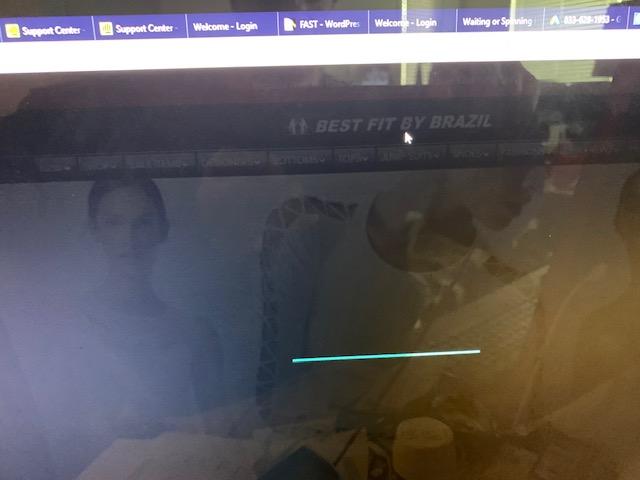
ok i enabled preloader and then i selected CSS and got this blue animated line when changing pages. Is there a way to change this to something else. I was trying to impliment this, but seems too complicated. I know i can select image instead of CSS and then use an image there in preloader, but where to get these images and are they just animated gifs transparent?
 March 28, 2019 at 10:53 am #30000
In reply to: WooCommerce Extra Checkout Fields for Brazil
Hi,
To add new font for site, please upload font to claue-child and add your css to claue-child > style.css
Kind regards
Harry
Premium Wordpress themes and plugins, Best WooCommerce theme https://themeforest.net/user/janstudio/portfolio?ref=janstudioMarch 27, 2019 at 5:57 pm #29973In reply to: Changing Preloader
Hi Rahim,
Please copy file footer.php from claue to claue-child and replace HTML code line 16 to 18 with your html code and add your css to claue-child > style.css
Kind regards
Harry
Premium Wordpress themes and plugins, Best WooCommerce theme https://themeforest.net/user/janstudio/portfolio?ref=janstudio -
AuthorSearch Results


Support Forum
We will do our best to assist you with any issues related to our themes and plugins.



