Hi Rahim,
I check on my local it work well on category page http://prntscr.com/lodep4 and my account page http://prntscr.com/lodexc
Please check your custom CSS code.
Regards
Harry
Premium Wordpress themes and plugins, Best WooCommerce theme https://themeforest.net/user/janstudio/portfolio?ref=janstudio
Hi Cssnik,
Please use new attach file and replace plugin claue-addons
Regards
Attachments:
You must be
logged in to view attached files.
Harry
Premium Wordpress themes and plugins, Best WooCommerce theme https://themeforest.net/user/janstudio/portfolio?ref=janstudio
Hi Harry,
The main style.css that you gave me is like the code that you gave me.

Please review the code if you are going to publish this in the theme.
And no change for my-account page.
Regards.
Rahim Vaziri
CEO & Founder at Look.ir
Hi,
You need upload featured image to make your blog more attractive. Just change “Continue Reading” button to text by add below code to Claue > Theme Option > General Layout > Custom CSS
.more-link {
	margin: 0;
	line-height: 1;
	border: none;
	text-align: right;
	width: 100%;
}
.post .post-thumbnail {
	margin-bottom: 0;
}
.post .post-content {
	background: #f6f6f8;
	padding: 25px 25px 25px;
}
Regards
Harry
Premium Wordpress themes and plugins, Best WooCommerce theme https://themeforest.net/user/janstudio/portfolio?ref=janstudio
Hi Van,
Please add below code to Claue > Theme Option > General Layout > Custom CSS
.products.jas-carousel .slick-prev {
	left: -30px;
}
.products.jas-carousel .slick-next {
	right: -30px;
}
Could you help us give our theme 5 stars rating and good review at https://themeforest.net/downloads
Thanks
Harry
Premium Wordpress themes and plugins, Best WooCommerce theme https://themeforest.net/user/janstudio/portfolio?ref=janstudio
Hi,
Please add custom css to Claue > Theme Option > General Layout > Custom CSS
iframe {max-width: 100%}
Regards
Harry
Premium Wordpress themes and plugins, Best WooCommerce theme https://themeforest.net/user/janstudio/portfolio?ref=janstudio
Hi Harry,
I’m not sure these happened after the update or not. but I have found some css bugs now.
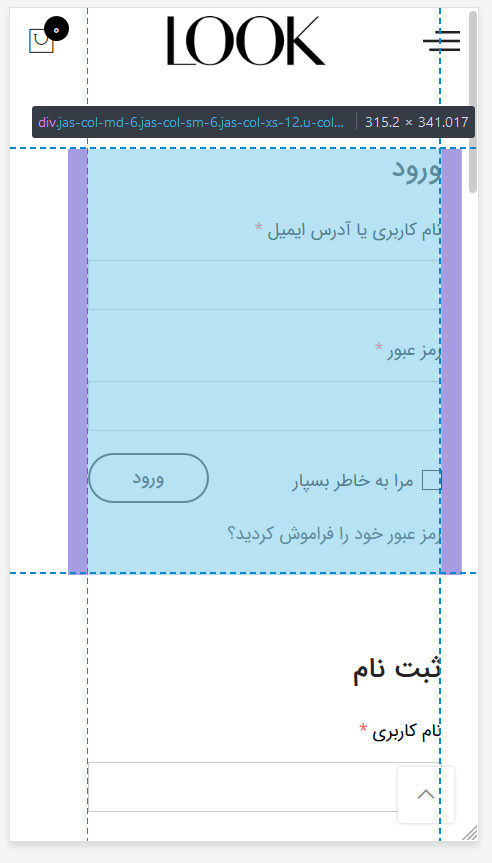
1: the https://look.ir/my-account page needs the css fix.
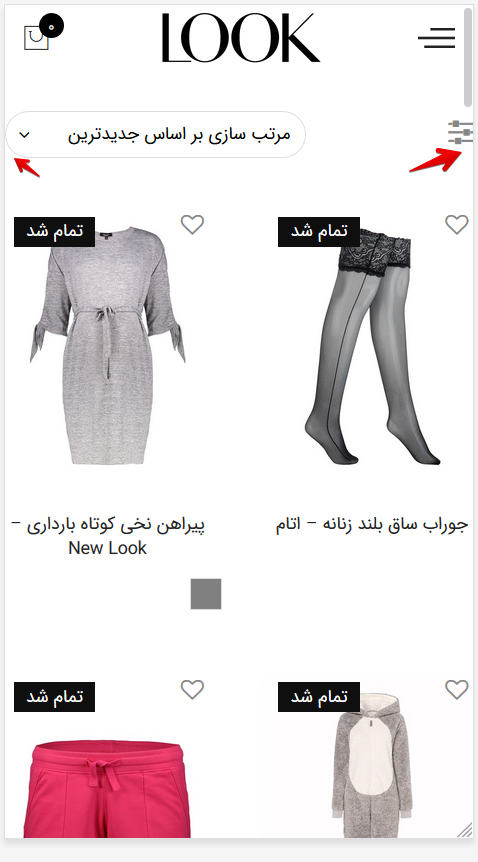
2. the archive pages like https://look.ir/women-beauty/ are like these. so compressed.

I will report you the other css bugs if I find.
Regards.
Rahim Vaziri
CEO & Founder at Look.ir
Hi Kalarit,
Please add below code to Claue > Theme Option > General Layout > Custom CSS
.sidebar .widget > ul > li {
	padding-left: 0;
}
.sidebar .widget ul li::before {
	display: none;
}
Regards
Harry
Premium Wordpress themes and plugins, Best WooCommerce theme https://themeforest.net/user/janstudio/portfolio?ref=janstudio
Hi ArtK,
Please use parent class to override our css, please send me the link and take a screenshot where you see conflict that will help us easy to track.
Thank and have a nice day!
Harry
Premium Wordpress themes and plugins, Best WooCommerce theme https://themeforest.net/user/janstudio/portfolio?ref=janstudio
Dear Harry 🙂
Hope everything is doing good. I recently updated your theme and found 2 lines using !important in style.css which made me edit it out since it was over-riding my style.css in child theme.
Lines 8392 and 8397 uses !important and this causes button mis-alignment unless I edit style.css directly. However, this means that during updates, I have to re-do it over and over again.
Hence, my question, is it absolutely important to keep them? 😉 I do not mind if you need to keep them. I will just make a note for the future so that no conflict occurs.
Thanks a have a nice evening 🙂
Best Regards,
Founder
Ak







