
-
AuthorSearch Results
-
November 13, 2018 at 10:07 am #26603
In reply to: remove order tracking from my account icon
Hi,
Please add below code to Claue > Theme Option > General Layout > Custom CSS
.jas-my-account ul li:nth-child(2) {display: none;}Regards
Harry
Premium Wordpress themes and plugins, Best WooCommerce theme https://themeforest.net/user/janstudio/portfolio?ref=janstudioNovember 12, 2018 at 4:17 pm #26564In reply to: Hover Zoom Effect
Hi,
Please add below code to Claue > Theme Option > General Layout > Custom CSS
.product-category img, .jas-banner img {
	width: auto !important;
	max-width: 100%;
}
Regards
Harry
Premium Wordpress themes and plugins, Best WooCommerce theme https://themeforest.net/user/janstudio/portfolio?ref=janstudioNovember 12, 2018 at 10:51 am #26553In reply to: Customization of Product Page (Woocommerce)
Hi,
1. Please add below code to Claue > Theme Option > General Layout > Custom CSS
.result-count-order {
	display: none;
}
2. Please edit the row wrap slider and uncheck in “Full height row” option http://prntscr.com/lh71x8
Regards
Harry
Premium Wordpress themes and plugins, Best WooCommerce theme https://themeforest.net/user/janstudio/portfolio?ref=janstudioNovember 11, 2018 at 7:17 pm #26536In reply to: Bugs in my website
Hi,
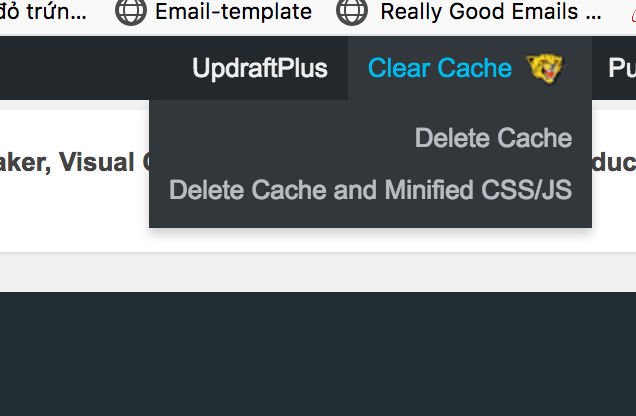
I check the code and see old code and just delete cache and minified js/css. For the next issue please clear cache and minified js/css and check again.
Regards
Harry
Premium Wordpress themes and plugins, Best WooCommerce theme https://themeforest.net/user/janstudio/portfolio?ref=janstudioNovember 11, 2018 at 5:45 pm #26530In reply to: Bugs in my website
Hi,
I’ve just deleted cache and minified JS/CSS on your site. It now ok, please check again.
Regards
Harry
Premium Wordpress themes and plugins, Best WooCommerce theme https://themeforest.net/user/janstudio/portfolio?ref=janstudioNovember 11, 2018 at 5:33 pm #26526In reply to: Theme Update
Yes, tell developer only customize the layout-4 and use css.
Regards
Harry
Premium Wordpress themes and plugins, Best WooCommerce theme https://themeforest.net/user/janstudio/portfolio?ref=janstudioNovember 11, 2018 at 5:23 pm #26524In reply to: Theme Update
Hi Harry,
1. My current version is 3.5.1
2. Ok. So the developer needs to customize the file layout-4.php and use css for the results. Right?
Regards.
Rahim Vaziri
CEO & Founder at Look.irNovember 11, 2018 at 5:18 pm #26522In reply to: Theme Update
Hi Rahim,
We don’t update code related to time loading add item to cart. Did you update WooCommerce to 3.5?
Yes, we recommend use css don’t use much js, because js will reduce performance of site.
Regards
Harry
Premium Wordpress themes and plugins, Best WooCommerce theme https://themeforest.net/user/janstudio/portfolio?ref=janstudioNovember 11, 2018 at 3:38 am #26509In reply to: Theme Update
Hi Rahim, This issue because you put logo and icons in a line but when sticky the icons move to a line with menu and logo disappear. You should have icons in a line with menu but not visible as normal, when header stick the icons in a line with menu will visible and the icons in a line with logo will disappear together with logo. Regards
Hi Harry,
I just want to check again with you.
Once you said for making the header like this, you don’t need to add js file.
You mean I can make the header like my current site with css only?
Regards.
Rahim Vaziri
CEO & Founder at Look.irNovember 10, 2018 at 10:18 am #26483In reply to: Frame within a category page
Hi,
Please add below code to Claue > Theme Option > General Layout > Custom CSS
#jas-content {
min-height: 50vh;
}Regards
Harry
Premium Wordpress themes and plugins, Best WooCommerce theme https://themeforest.net/user/janstudio/portfolio?ref=janstudio -
AuthorSearch Results


Support Forum
We will do our best to assist you with any issues related to our themes and plugins.



