Hi Rahim,
Please copy the code to rtl.css, we included this fix for the next update.
Kind regards
Harry
Premium Wordpress themes and plugins, Best WooCommerce theme https://themeforest.net/user/janstudio/portfolio?ref=janstudio
Hi Harry,
I have a question.
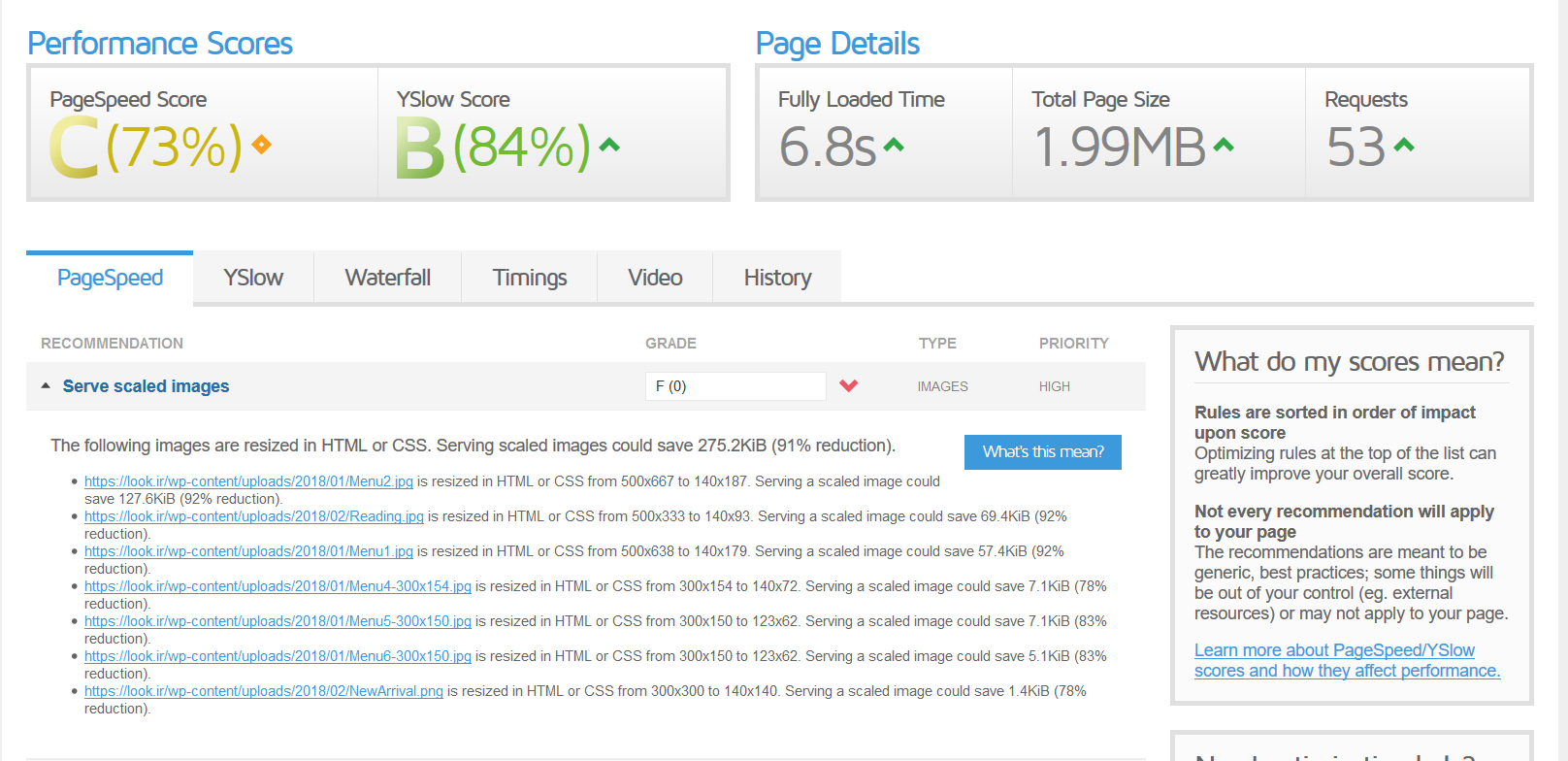
When I test my website in the GTMetrix.com , I see some images in the ” Serve Scaled Images ” that say to me for example :
” https://look.ir/wp-content/uploads/2018/01/Menu2.jpg is resized in HTML or CSS from 500×667 to 140×187. Serving a scaled image could save 127.6KiB (92% reduction). ”
So for doing the optimizing I should reduce the size of the photo to 140×187
But the problem is when I reduce the size, I lose the quality!
What is difference between reducing via css and photoshop?
Because the results say you should change the size, but after changing the size I lose the quality and in some cases the file has more size!
Rahim Vaziri
CEO & Founder at Look.ir
Hi Harry,
I added the code, but it was not working maybe because you have added the LTR mode in the rtl.css
so I added !important and now it’s working. but the picture of the product is also on the left!
http://take.ms/RFPfB
Rahim Vaziri
CEO & Founder at Look.ir
Hi Rahim,
Please add below code to Theme Option > General Layout > Custom CSS
@media only screen and (max-width: 736px) {
	[dir="rtl"] table.shop_table_responsive tr td:not(.product-quantity) {
		text-align: left;
	}
	[dir="rtl"]	table.shop_table_responsive .product-quantity .quantity {
		float: left;
		margin-left: 0;
	}
}
Kind regards
Harry
Premium Wordpress themes and plugins, Best WooCommerce theme https://themeforest.net/user/janstudio/portfolio?ref=janstudio
Hi,
Please create new folder “js” on your child theme and add below code to file functions.php
wp_enqueue_script( 'custom-script', get_stylesheet_directory_uri() . '/js/custom_script.js', array( 'jquery' ) );
and change code
function jas_claue_enqueue_script() {
	wp_enqueue_style( 'jas-claue-parent-style', get_template_directory_uri() . '/style.css' );
}
add_action( 'wp_enqueue_scripts', 'jas_claue_enqueue_script' );
to
*/
function jas_claue_enqueue_script() {
wp_enqueue_style( ‘jas-claue-parent-style’, get_template_directory_uri() . ‘/style.css’ );
wp_enqueue_script( ‘custom-script’, get_stylesheet_directory_uri() . ‘/js/custom_script.js’, array( ‘jquery’ ) );
}
add_action( ‘wp_enqueue_scripts’, ‘jas_claue_enqueue_script’ );
with custom_script.js is the file contain your script code.
Kind regards
Harry
Premium Wordpress themes and plugins, Best WooCommerce theme https://themeforest.net/user/janstudio/portfolio?ref=janstudio
Hi,
Please add below code to claue-child > style.css
@import url('https://fonts.googleapis.com/css?family=Playfair+Display');
.sub-title {
	font-family: "Playfair Display",serif;
}
And after that please activate child theme.
Kind regards
Harry
Premium Wordpress themes and plugins, Best WooCommerce theme https://themeforest.net/user/janstudio/portfolio?ref=janstudio
Hi ArtK,
No more user use plugin “Buy For Me” so we don’t include this for core theme, If you want you can update in your custom CSS.
Kind regards
Harry
Premium Wordpress themes and plugins, Best WooCommerce theme https://themeforest.net/user/janstudio/portfolio?ref=janstudio
This reply has been marked as private.
Hi,
Sorry for late reply.
1. Please download file and replace in themes/claue/core/libraries/vendors/woocommerce/init.php
2. Please add below code to Claue > Theme Option > General Layout > Custom CSS
.woocommerce-breadcrumb {
	width: 1170px;
	margin: 0 auto;
max-width: 100%;
}
3. Please add below code
.pswp__button--arrow--left,
.pswp__button--arrow--right {
	margin-top: -25px;
	width: 50px;
	height: 50px;
}
.pswp__ui--idle .pswp__button--arrow--left,
.pswp__ui--idle .pswp__button--arrow--right {
	opacity: 1;
}

button.pswp__button, button.pswp__button:hover,
button.pswp__button--arrow--left::before,
button.pswp__button--arrow--right::before {
	background-color: #333 !important;
}
.pswp__button--arrow--left::before {
	left: 10px;
}
.pswp__button--arrow--right::before {
	right: 10px;
}
.pswp__button--arrow--left {
	left: 15px;
}
.pswp__button--arrow--right {
	right: 15px;
}
4. I checked on your site and on my local it still work well http://take.ms/aKWCF
Did you fix this?
Harry
Premium Wordpress themes and plugins, Best WooCommerce theme https://themeforest.net/user/janstudio/portfolio?ref=janstudio
This reply has been marked as private.








