
-
AuthorSearch Results
-
February 24, 2018 at 11:01 pm #17413
In reply to: Added Currency – nothing has happened
Hi,
Please download attach file and extract to claue-child > views > header
and add below code to claue > theme Option > general layout > Custom CSS
.header-5 .jas-currency {
	margin-top: 20px;
}
.header-5 .jas-currency ul {
	width: 100%;
	left: 0;
	right: 0;
	top:  120%;
}
.header-5 .jas-currency:hover ul {
	top:  100%;
}
Best regards
Attachments:
You must be logged in to view attached files.Harry
Premium Wordpress themes and plugins, Best WooCommerce theme https://themeforest.net/user/janstudio/portfolio?ref=janstudioFebruary 24, 2018 at 10:21 pm #17411In reply to: My Account Icon – Order Tracking goes to 404 page
Hi,
Sorry the tracking order (it tracking status of order) function different with list of orders ( show products in an order) of your link. You can hide the link on my account icon by add custom code in Claue > Theme Option > General Layout > Custom CSS
.jas-my-account ul li:nth-child(2) { display: none;}Best regards
Harry
Premium Wordpress themes and plugins, Best WooCommerce theme https://themeforest.net/user/janstudio/portfolio?ref=janstudioFebruary 24, 2018 at 5:02 am #17389Hi Harry
At moment I am working on a landing page for our shop just to link to our shop. Here is your cool design of the lines great.
But I am don`t understand how they work. sometimes it is cool, sometimes it looks strange 🙂if you need a login I send it in the next message.
My wish is there a option that I can say the line please go from left>right or right>left or up>down or down>up.
So it will be possible to set there a row with 3 columns or can better control the single picture.
<hr />
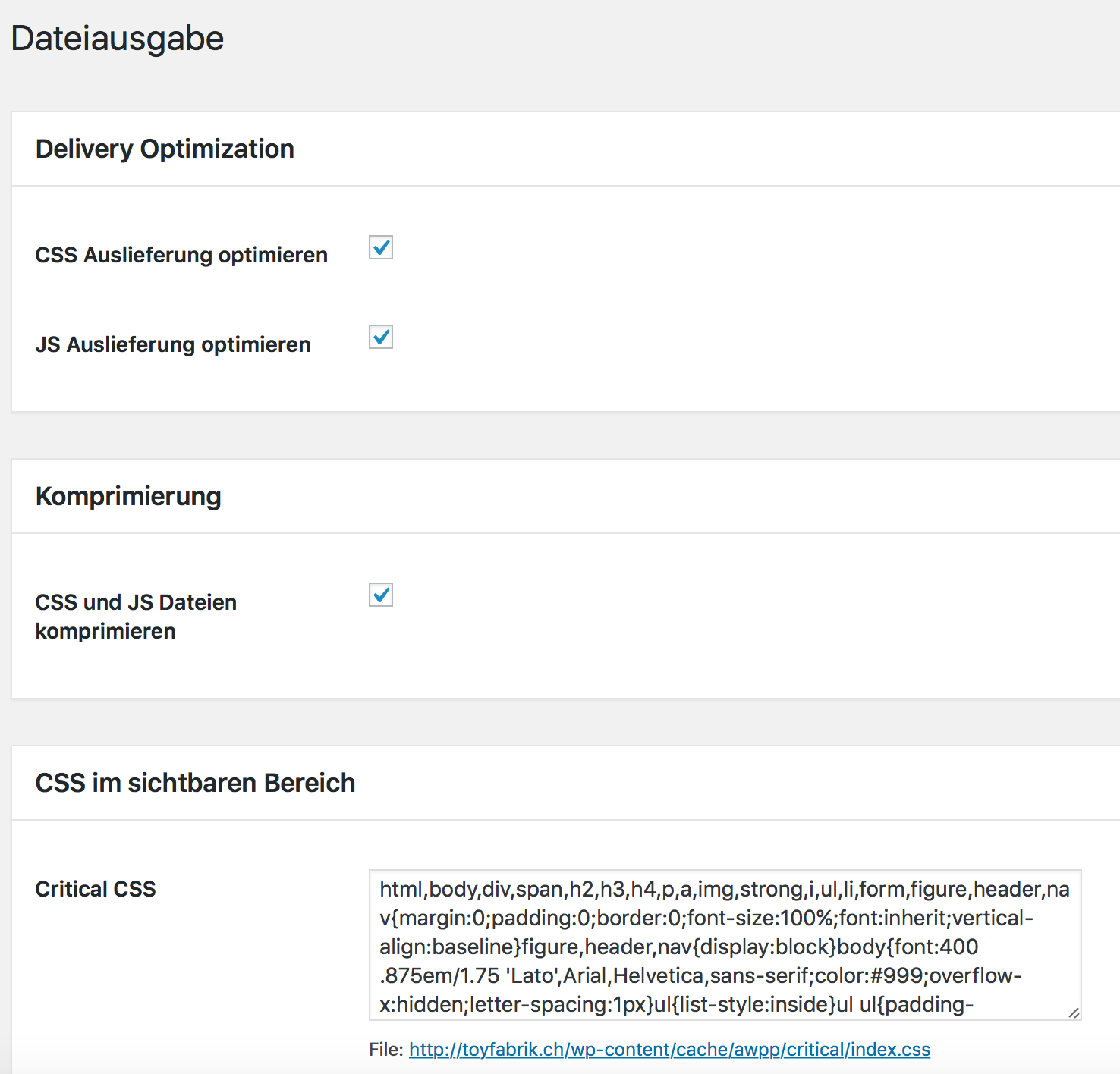
Yesterday I was on a WordPress seminar in Bern with topic performance problems. The speaker create also a plugin: Advanced WPPerformance by Nico Martin. It helps me really great to give your template a big speed up. Your template is so great but also get really huge of so much css and js. So here comes the help. Especially to load the critical css before and set the rest css and js down to the footer. It brings me really much power. perhaps you can implement the plugin to gecko. my big problem is at moment the DOM till the first byte get loaded. So I have to clear it with the hoster. Your template and you did a great job!
Thanks and I hope you have a idea for the lines 🙂
Best regards
René
 February 24, 2018 at 12:02 am #17379
I’ve deleted the debug file several times (because it’s overloading my memory) but it just files up again.
These are the additional errors I’m getting since activating the Claue theme:
PHP Notice: is_page was called incorrectly. Conditional query tags do not work before the query is run. Before then, they always return false. Please see Debugging in WordPress for more information. (This message was added in version 3.1.0.) in /home/consciouscraftie/public_html/wp-includes/functions.php on line 4147
PHP Warning: file_put_contents(/home/consciouscraftie/public_html/wp-content/cache/autoptimize/css/autoptimize_snippet_ed0ea2eef6fc46238c8586d9a8e9632c.css): failed to open stream: No such file or directory in /home/consciouscraftie/public_html/wp-content/plugins/autoptimize/classes/autoptimizeCache.php on line 59
Trying to get property of non-object in /home/consciouscraftie/public_html/wp-includes/class-wp-query.php on line 3736
[21-Feb-2018 20:02:18 UTC] PHP Notice: Trying to get property of non-object in /home/consciouscraftie/public_html/wp-includes/class-wp-query.php on line 3738
[21-Feb-2018 20:02:18 UTC] PHP Notice: Trying to get property of non-object in /home/consciouscraftie/public_html/wp-includes/class-wp-query.php on line 3740This is a WCV one:
PHP Notice: Undefined index: _backorders in /home/consciouscraftie/public_html/wp-content/plugins/wc-vendors-pro/public/class-wcvendors-pro-product-controller.php on line 1017and another WCV one:
Trying to get property of non-object in /home/consciouscraftie/public_html/wp-content/plugins/wc-vendors-pro/includes/class-wcvendors-pro-ratings-controller.php on line 618PHP Notice: Undefined index: national_disable in /home/consciouscraftie/public_html/wp-content/plugins/wc-vendors-pro/templates/front/shipping/shipping-panel.php on line 25
PHP Notice: Undefined index: international_disable in /home/consciouscraftie/public_html/wp-content/plugins/wc-vendors-pro/templates/front/shipping/shipping-panel.php on line 36
Can you do some investigation as to why this would be happening?
Many thanks,
Karen
February 23, 2018 at 10:58 am #17352Hi Rene’
For the line i use custom css code it doesn’t have option to control. Let me know how you want to do.
Best regards
Harry
Premium Wordpress themes and plugins, Best WooCommerce theme https://themeforest.net/user/janstudio/portfolio?ref=janstudioFebruary 22, 2018 at 8:58 pm #17314In reply to: Changing the background of the brands
Hi,
Sorry, our theme only support woocommerce category it different with brand, which plugin you are using for brand?
It now have away use same background for all brand by add code in Claue > theme option > general layout > Custom CSS
.tax-product_brand .jas-wc .page-head {
	background-image: url(https://zeymc.com/wp-content/uploads/2017/12/header.jpg);
	background-position: center center;
	background-size: cover;
}
and change “https://zeymc.com/wp-content/uploads/2017/12/header.jpg” with your image path
Best regards
Harry
Premium Wordpress themes and plugins, Best WooCommerce theme https://themeforest.net/user/janstudio/portfolio?ref=janstudioFebruary 20, 2018 at 5:27 pm #17284In reply to: Don´t upload google fonts.
Hi,
1. You can remove related products on single page by add custom css code in Claue > Theme Option > General Layout > Custom CSS
.product-extra { display: none;}
2. You can edit these info in Attribute and Variation tab http://take.ms/ypuov
Best regards
Harry
Premium Wordpress themes and plugins, Best WooCommerce theme https://themeforest.net/user/janstudio/portfolio?ref=janstudioFebruary 20, 2018 at 4:49 pm #17281In reply to: Weight Attribute Problem
Hi,
Sorry for late reply.
1. Please go to Claue > Theme Option > WooCommerce > Product Listing Settings > Enable Products Attribute On Product List and check in weight
2. Please add below code to Claue > Theme Option > General Layout > custom CSS
.swatch__value {
	width: 34px;
	height: 34px;
	line-height: 36px;
}
and please remove space between number and gm ( 2 gm to 2gm)
Best regards
Harry
Premium Wordpress themes and plugins, Best WooCommerce theme https://themeforest.net/user/janstudio/portfolio?ref=janstudioFebruary 19, 2018 at 4:59 am #17263In reply to: Don´t upload google fonts.
Hi!
Now, load perfect but i put this code before because the theme uploaded the parent css after the child css.
function jas_claue_child_enqueue_script() {
wp_enqueue_style( ‘jas-claue-parent-style’, get_template_directory_uri() . ‘/style.css’ );
}
add_action( ‘wp_enqueue_scripts’, ‘jas_claue_child_enqueue_script’ );Anothers questions:
1.How can I remove relateds products on single product page?
2. On sigle product page, “additional information” appears within the tabs. How can I modify this information?Thank you very much! 🙂
February 18, 2018 at 12:30 am #17252In reply to: How to make the text of the variations show?
Hi,
Please add below code to Claue > Theme Option > General Layout > Custom CSS
@media only screen and (max-width: 800px) {
.swatch__list–item .swatch__tooltip {
top: -30px;
opacity: 1;
visibility: visible;
}
}Best regards
Harry
Premium Wordpress themes and plugins, Best WooCommerce theme https://themeforest.net/user/janstudio/portfolio?ref=janstudio -
AuthorSearch Results


Support Forum
We will do our best to assist you with any issues related to our themes and plugins.






