
-
AuthorSearch Results
-
September 18, 2017 at 10:26 pm #10333
In reply to: Size attributes on product picture
Hi,
- You mean when you click on the product size, the image didn’t change?
- Which IE version do you using? Our theme supports IE 11+ only
- Please use this custom CSS code (add it into Claue Theme Options) https://pastebin.com/ySLVCXA3
- Some strings from the plugin, You need to translate it in the plugin. Could you please provide me all words which you can’t translate, I will give you a guide.
Best regards,
FosterSeptember 18, 2017 at 4:23 pm #10313In reply to: RTL issues
This reply has been marked as private.Harry
Premium Wordpress themes and plugins, Best WooCommerce theme https://themeforest.net/user/janstudio/portfolio?ref=janstudioSeptember 18, 2017 at 12:36 am #10291In reply to: grid with filter
Hi,
I put 3 attachment to show you that it is ok. 1) I apply the themeforest-1586…zip 2)I go in gecko_main_files 3)Go in gecko-child 4) In the folder that has: funtions.php, screenshot.png and style.css I should have a create to “woocomerce and loop” folder and then copy “loop-start.php” file into this folder. Is it ok? thanks


 September 18, 2017 at 12:21 am #10290
In reply to: Size Guide Image
Hi,
You can add custom css in JanStudio > Theme Option > General Layout > Custom CSS
.single-product img.mfp-img { max-height: inherit !important;}
Best regards
Harry
Premium Wordpress themes and plugins, Best WooCommerce theme https://themeforest.net/user/janstudio/portfolio?ref=janstudioSeptember 17, 2017 at 11:11 pm #10287In reply to: Icons turn to Squares
Hi,
Sorry i check again and saw the plugin combine css file and and save to another folder so the path to font file wrong. Could you tell me which plugin you are using to combine css. We recommend disable this plugin and use plugin autoptimize https://wordpress.org/plugins/autoptimize/ to minify css and https://wordpress.org/plugins/wp-super-cache/ to push your site speed
Now, I upload font files to upload folder to temporary fix issue with font icon on your site.
Best regards
Harry
Premium Wordpress themes and plugins, Best WooCommerce theme https://themeforest.net/user/janstudio/portfolio?ref=janstudioSeptember 17, 2017 at 9:06 am #10258In reply to: product no title
Hi,
You can add custom css code in JanStudio > Theme Option > General Layout > Custom CSS
.jas-wc-single {
padding-top: 100px;
}Best regards
Harry
Premium Wordpress themes and plugins, Best WooCommerce theme https://themeforest.net/user/janstudio/portfolio?ref=janstudioSeptember 16, 2017 at 11:12 pm #10245In reply to: sale, hot or new tag
Hi,
1. The new badge display when you publish product. You can edit number day display this badge when you edit this product and scroll down to Product Detail Layout Option > New Arrival Product
2. The sale badge display when you set sale price for product.
3. Our theme doesn’t support Hot badge
4. You can change background color for badge by add custom css or wait for next update version
.badge span.new {
background: #56cfe1;
}
.badge span.sale {
background: #fe9931;
}change #56cfe1 and #fe9931 with your color
Best regards
Harry
Premium Wordpress themes and plugins, Best WooCommerce theme https://themeforest.net/user/janstudio/portfolio?ref=janstudioSeptember 16, 2017 at 11:04 pm #10244In reply to: default product variation display
please enable add to cart button in theme option and add custom css
.product-info.mt__15 {
text-align: left;
}The product title should be decrease to have space for wishlist and add to cart icon.
Best regards
Harry
Premium Wordpress themes and plugins, Best WooCommerce theme https://themeforest.net/user/janstudio/portfolio?ref=janstudioSeptember 16, 2017 at 10:14 pm #10243In reply to: different layout on home page
Dear Harry thanks for your help
can you help me once again?
actually I want to use header layout like my attachment before
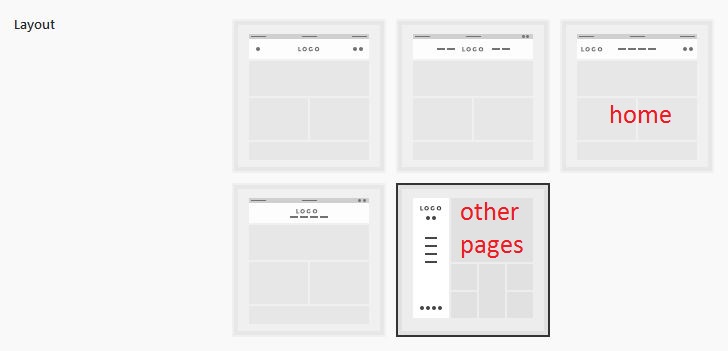
Just header layout, I will do rest (html and css)
Help me with child theme
Thanks again
Hi,
Please use new one.
On document 2
4. You should crop your image before upload
5. You can add custom css.jas-wc-single .page-head { display: none;}
Best regards
Attachments:
You must be logged in to view attached files.Harry
Premium Wordpress themes and plugins, Best WooCommerce theme https://themeforest.net/user/janstudio/portfolio?ref=janstudio -
AuthorSearch Results


Support Forum
We will do our best to assist you with any issues related to our themes and plugins.





