Hi Donna,
Please add below code to Claue > Theme Option > General Layout > Custom CSS
span.badge {
	display: none;
}
Kind regards
Harry
Premium Wordpress themes and plugins, Best WooCommerce theme https://themeforest.net/user/janstudio/portfolio?ref=janstudio
Hi Donna,
Please add below code to Claue > Theme Option > General Layout > Custom CSS
span.badge {
	display: none;
}
Kind regards
Harry
Premium Wordpress themes and plugins, Best WooCommerce theme https://themeforest.net/user/janstudio/portfolio?ref=janstudio
Dear Harry,
Last time you helped me great with a CSS code to hide the double badges (we bought the Badges Management), but all the other badgets are still double, like the attachment. So we need to hide the badgets from the Claue theme, so the badges from the plugin will only be seen.
Hi Eli,
Please add below code to Claue > Theme Option > General Layout > Custom CSS
.jas-menu > li > a,.jas-menu ul li a {
	font-weight: 500;
}
Kind regards
Harry
Premium Wordpress themes and plugins, Best WooCommerce theme https://themeforest.net/user/janstudio/portfolio?ref=janstudio
They do not work correctly, selecting a variation does not show the image that is actually set. I have tried to remove the optimization of both cloudlare and WP Rocket, I have removed the minification of javascript, css and html.
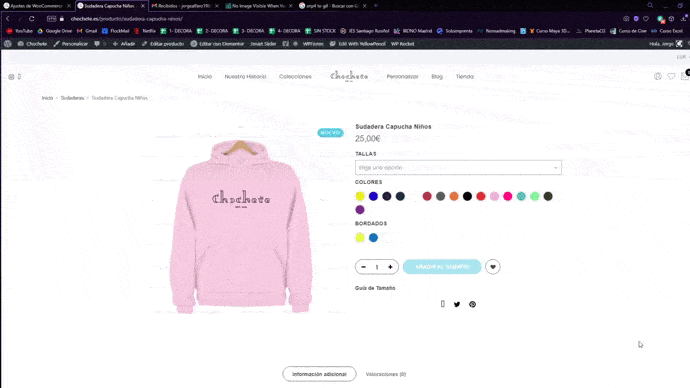
Attachments:
You must be
logged in to view attached files.
Hi Jacky,
Please add below code to Claue > Theme Option > General Layout > Custom CSS
input[type="submit"], button, a.button,
.jas-ajax-load a, button.button,
.br__40 {
	border-radius: 0;
}
Kind regards
Harry
Premium Wordpress themes and plugins, Best WooCommerce theme https://themeforest.net/user/janstudio/portfolio?ref=janstudio
Hi Asdemodas,
Please add code to Claue > Theme Option > General Layout > Custom CSS
Kind regards
Harry
Premium Wordpress themes and plugins, Best WooCommerce theme https://themeforest.net/user/janstudio/portfolio?ref=janstudio
Hi Jorge,
I fix the css code on your site but it now still have cache. Can you please clear cache on your site to it apply new code.
Kind regards
Harry
Premium Wordpress themes and plugins, Best WooCommerce theme https://themeforest.net/user/janstudio/portfolio?ref=janstudio
hola harry donde pego el codigo del apartado 2 del css ?
Hi Claire,
Please add below code to JanStudio > Theme Option > General Layout > Custom CSS
.woocommerce .product-category h2, .product-category h2, .woocommerce .product-category h3, .product-category h3 {
	position: relative;
	left: 0;
	padding: 15px 0;
}
.product-category h2::after, .product-category h3::after {
	left: 75px;
}
.product-category h2::before, .product-category h3::before {
	left: 0;
}
Kind regards
Harry
Premium Wordpress themes and plugins, Best WooCommerce theme https://themeforest.net/user/janstudio/portfolio?ref=janstudio








