
-
AuthorSearch Results
-
September 8, 2020 at 9:55 pm #38403
In reply to: BeRocket AJAX filter and YITH Wishlist button
Hi,
1. you need to edit the filter to https://prnt.sc/udoe4f
and add below code to JanStudio > Theme Option > General Layout > Custom CSS
.jas-top-sidebar .yith-woocommerce-ajax-product-filter {
	width: 20%;
}
2. Please add below code
.btn-atc.stripe-enabled .yith-wcwl-add-to-wishlist {margin-top: 60px;}3. Please try contact to plugin author, i’m not sure why it not show
Kind regards
Harry
Premium Wordpress themes and plugins, Best WooCommerce theme https://themeforest.net/user/janstudio/portfolio?ref=janstudioSeptember 7, 2020 at 9:11 am #38383In reply to: Theme icon and text statements
Hi,
Please add more code in Claue > Theme Option > General Layout > Custom CSS
.jas-service p.mg__0 {
	line-height: 1.2;
}
.jas-service .title {
	margin-bottom: 3px;
}
Kind regards
Btw, you support expired. Could you please renew your support.
Thanks
Harry
Premium Wordpress themes and plugins, Best WooCommerce theme https://themeforest.net/user/janstudio/portfolio?ref=janstudioSeptember 6, 2020 at 9:35 pm #38377In reply to: Them not show
Hi,
1. You need install plugin to support more badge https://wordpress.org/plugins/yith-woocommerce-badges-management/
2,3,4,5. Please add code in Claue > Theme Option > General Layout > Custom CSS
.product-extra-title h2:before, .product-extra-title h2:after {background-color: #222 !important}
.jas-ajax-load a:hover {color: #fff !important;}
.woocommerce .widget_layered_nav ul.yith-wcan-label li a:hover, .woocommerce-page .widget_layered_nav ul.yith-wcan-label li a:hover, .woocommerce .widget_layered_nav ul.yith-wcan-label li.chosen a, .woocommerce-page .widget_layered_nav ul.yith-wcan-label li.chosen a {background-color: blue !important;}
.ui-autocomplete {background: #000;}
and change #222 with your color
Kind regards
Harry
Premium Wordpress themes and plugins, Best WooCommerce theme https://themeforest.net/user/janstudio/portfolio?ref=janstudioSeptember 6, 2020 at 10:07 am #38362Topic: Theme icon and text statements
in forum Claue bestfitbybrazilParticipant
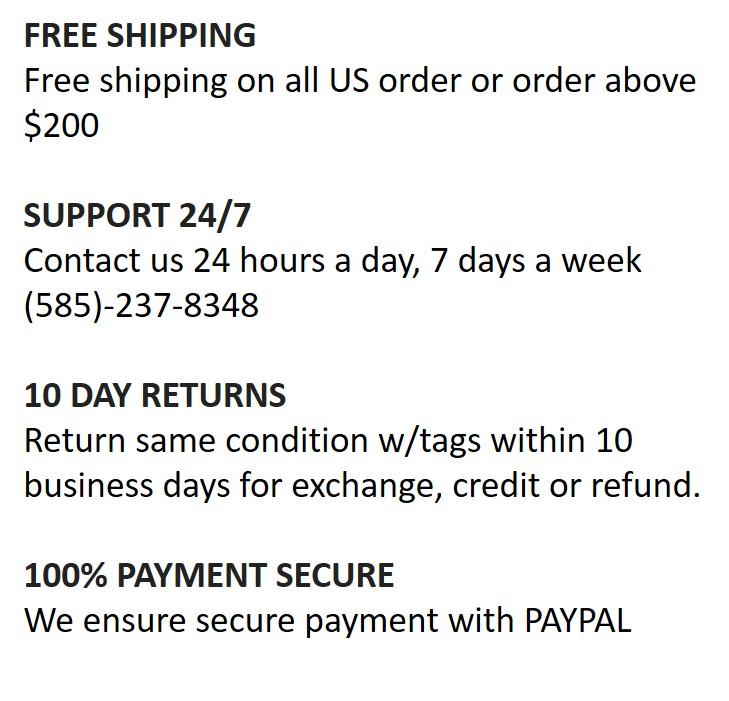
on my home page at the bottom, the text and titles format is bad. the titles are too close to bottom of previous sections and the descriptions lines are too far apart vertically. i tried using css to clean this up but the element names don’t work in additional css area. how to format these elements. The element names i tried to use were as follows:
title cp tu fs__14 mg__0 mb__5 for TITLE
mg__0 for descriptions
Looks like this now:
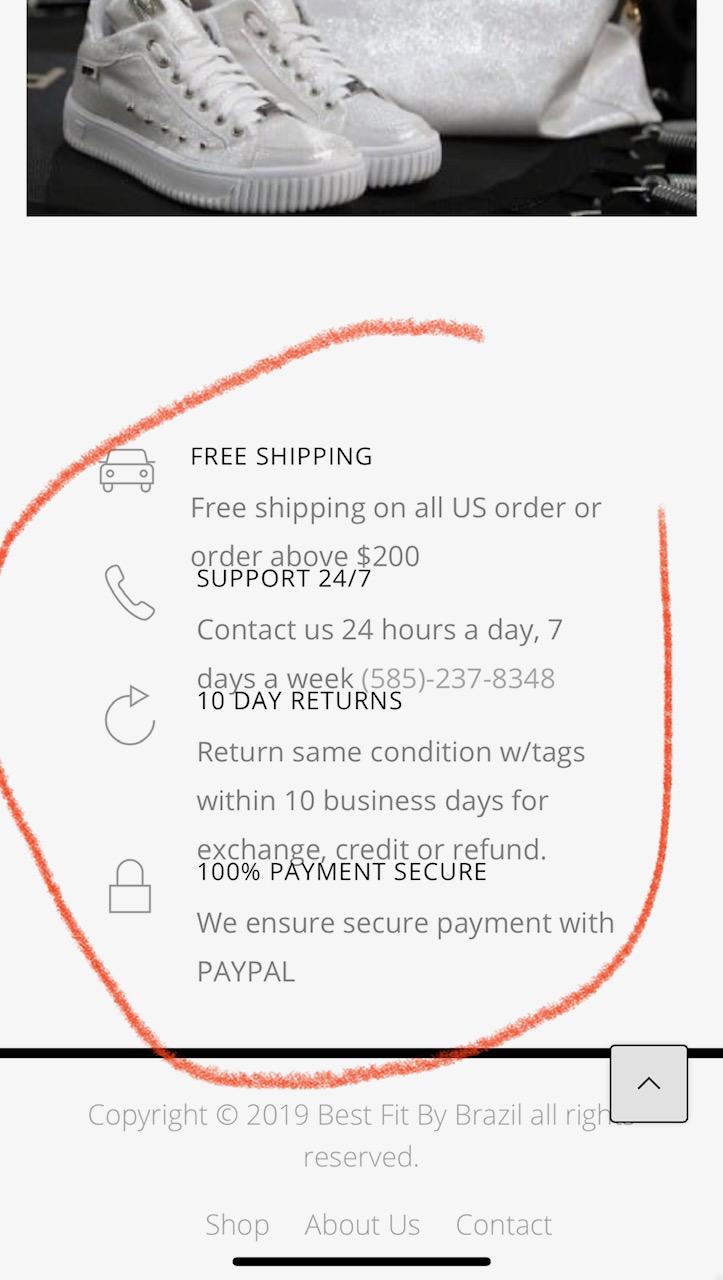
SHOULD LOOK LIKE THIS:
 August 31, 2020 at 10:37 pm #38295
In reply to: Remove Order Tracking is Customer Login Dashboard
Hi Dwayne,
Please add below code to Claue > Theme Option > General Layout > Custom CSS
.jas-my-account ul li:nth-child(2) {display: none}Kind regards
Harry
Premium Wordpress themes and plugins, Best WooCommerce theme https://themeforest.net/user/janstudio/portfolio?ref=janstudioAugust 28, 2020 at 11:11 pm #38274In reply to: Need Claue theme support
Hi Mohit,
Thank you for buy more license from us. We not get email inform when have user buy our theme.
1. Please add more code to change color of menu and sub-menu on homepage
.home .jas-menu > li > a {
	color: #fff !important;
}
.home .jas-menu ul a,
.home .jas-account-menu ul a,
.home .jas-menu ul li a {
	color: #fff !important;
}
.home #jas-footer {
	color: #fff;
	background: #000;
}
.home .footer__top .widget-title {
	color: #fff;
}
2. It not have option to show social on header and footer of specific page. It only way show social icons on content page contact page https://prnt.sc/u7leew by add below code to content
<ul class="jas-social mt__15">
	<li><a href="https://www.cococape.com" title="Facebook">
		<i class="fa fa-facebook"></i>
	</a></li>
	<li><a href="cococape.com" title="Twitter">
		<i class="fa fa-twitter"></i>
	</a></li>
	<li><a href="cococape.com" title="Google Plus">
		<i class="fa fa-google-plus"></i>
	</a></li>

	<li><a href="cococape.com" title="Instagram">
		<i class="fa fa-instagram"></i>
	</a></li>
	<li><a href="https://cococape.com/" title="Pinterest">
		<i class="fa fa-pinterest-p"></i>
	</a></li>
</ul>
and add custom CSS code in theme option
.jas-social li {
	display: inline-block;
}
Kind regards
Harry
Premium Wordpress themes and plugins, Best WooCommerce theme https://themeforest.net/user/janstudio/portfolio?ref=janstudioAugust 28, 2020 at 10:13 pm #38272In reply to: code needed to change background of breadcrumbs
Hi,
1. Please add below code to Claue > Theme Option > General Layout > Custom CSS
.jas-wc-single .bgbl, #jas-content > .bgbl, .jas-breadcrumb {
	background: #f4eeed;
}
and change #f4eeed with your color.
2. Please add below code
.page-head h1 {
	text-transform: none;
	color: #000000;
	font-weight: bold;
}
and change #000 with your color.
Btw, your support expired. Please renew your support at https://themeforest.net/item/claue-clean-minimal-woocommerce-theme/18929281
We ask you renew support 3 times, if you not renew your support we sorry for stop support you.
Thank and regards
Harry
Premium Wordpress themes and plugins, Best WooCommerce theme https://themeforest.net/user/janstudio/portfolio?ref=janstudioAugust 28, 2020 at 12:28 pm #38261In reply to: Need Claue theme support
Hi Mohit,
1. You want show social icon home header and footer only for Contact page? Or show on all pages and more social icon for contact page?
2. Please add custom CSS code
body.home {
	background: #000;
}
I see you use our theme for new site, did you buy new license for new site. One license only use for one site.
Kind regards
Harry
Premium Wordpress themes and plugins, Best WooCommerce theme https://themeforest.net/user/janstudio/portfolio?ref=janstudioAugust 25, 2020 at 6:49 pm #38237In reply to: Add Text before Icon
Hi Rahim,
thank you i’m fine.
Please add below code to Custom CSS
.filter-trigger::before {
	content: 'Filter';
	padding-right: 10px;
	font-size: 18px;
}
Kind regards
Harry
Premium Wordpress themes and plugins, Best WooCommerce theme https://themeforest.net/user/janstudio/portfolio?ref=janstudioAugust 24, 2020 at 7:18 pm #38219In reply to: Menu Tab – Category expand & collapse actions
Hi Dwayne,
Please add below code to Claue > Theme Option > General Layout > Custom CSS
.header-5 .holder {
	width: 100%;
	left: 0;
}
Kind regards
Harry
Premium Wordpress themes and plugins, Best WooCommerce theme https://themeforest.net/user/janstudio/portfolio?ref=janstudio -
AuthorSearch Results


Support Forum
We will do our best to assist you with any issues related to our themes and plugins.
Response time up to 1-2 business days.
Our timezone:12:04 PM
Your timezone:
-
Search Results
-
on my home page at the bottom, the text and titles format is bad. the titles are too close to bottom of previous sections and the descriptions lines are too far apart vertically. i tried using css to clean this up but the element names don’t work in additional css area. how to format these elements. The element names i tried to use were as follows:
title cp tu fs__14 mg__0 mb__5 for TITLE
mg__0 for descriptions
Looks like this now:
SHOULD LOOK LIKE THIS:

