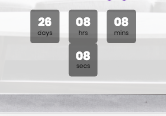
Hello I am trying to edit the countdown because the seconds are dropping down on mobile screen size. any help would be great. i can’t figure out the css and i don’t see any options in the theme settings. I think a simple solution could be to hide the seconds but i can’t figure it out.
Thank you
please add below code to JanStudio > theme option > general layout > custom CSS to fix issue 1
.wc-tabs li a {display: inline-block;}
Kind regards
Harry
Premium Wordpress themes and plugins, Best WooCommerce theme https://themeforest.net/user/janstudio/portfolio?ref=janstudio
Hi Harry,
This one needs a small CSS fix: http://prntscr.com/o9x11l
Regards.
Rahim Vaziri
CEO & Founder at Look.ir
Hi,
1,2,3,4. Please add below code to claue > theme option > general layout > custom css to fix
.jas-my-account ul {
	z-index: 15;
}
.p-item.woocommerce-product-gallery__image a {
	pointer-events: none;
}
.jas-currency {
	color: #222;
}
.woocommerce-ordering select option[value="price"],
.woocommerce-ordering select option[value="price-desc"] {display: none;}
5. I’m sorry it can’t redirect to same page the guest come before.
Kind regards
Harry
Premium Wordpress themes and plugins, Best WooCommerce theme https://themeforest.net/user/janstudio/portfolio?ref=janstudio
Hi,
I remove file pagination.php in child theme and remove code in Theme Option > General Layout > Custom CSS, it now back to original
Kind regards
Harry
Premium Wordpress themes and plugins, Best WooCommerce theme https://themeforest.net/user/janstudio/portfolio?ref=janstudio
Hi,
The issue because you don’t add css in Theme Option > General Layout > Custom CSS
I added it work now
@keyframes lds-eclipse {
	0% {
		-webkit-transform: rotate(0deg);
		transform: rotate(0deg);
	}
	50% {
		-webkit-transform: rotate(180deg);
		transform: rotate(180deg);
	}
	100% {
		-webkit-transform: rotate(360deg);
		transform: rotate(360deg);
	}
}
@-webkit-keyframes lds-eclipse {
	0% {
		-webkit-transform: rotate(0deg);
		transform: rotate(0deg);
	}
	50% {
		-webkit-transform: rotate(180deg);
		transform: rotate(180deg);
	}
	100% {
		-webkit-transform: rotate(360deg);
		transform: rotate(360deg);
	}
}
.lds-eclipse {
	position: relative;
	display: inline-block;
}
.lds-eclipse a {
	position: absolute;
	-webkit-animation: lds-eclipse 0.5s linear infinite;
	animation: lds-eclipse 0.5s linear infinite;
	width: 160px;
	height: 160px;
	top: 20px;
	left: 20px;
	border-radius: 50%;
	box-shadow: 0 10px 0 0 #e06ed3;
	-webkit-transform-origin: 80px 85px;
	transform-origin: 80px 85px;
	background: none;
	border: none;
	text-indent: -999em;
}
.lds-eclipse {
	width: 200px !important;
	height: 200px !important;
	-webkit-transform: translate(-100px, -100px) scale(1) translate(100px, 100px);
	transform: translate(-100px, -100px) scale(1) translate(100px, 100px);
}
.jas-ajax-load a:hover{
	background: none !important;
	border: none !important;
	box-shadow: 0 10px 0 0 #e06ed3;
}
Kind regards
Harry
Premium Wordpress themes and plugins, Best WooCommerce theme https://themeforest.net/user/janstudio/portfolio?ref=janstudio
Hi Joel,
Please add below code to JanStudio > Theme Option > General Layout > Custom CSS
.btn-atc .cart:not(.variations_form) {
	display: inline-block;
}
Kind regards
Harry
Premium Wordpress themes and plugins, Best WooCommerce theme https://themeforest.net/user/janstudio/portfolio?ref=janstudio
Hi Guys,
I am trying to use woocommerce.com’s Product Add on plugin as a way of bypassing the amount of variations I have thus slowing the site down.
I am having issues as the form looks messy and the add to cart button is too far to the right. You can see an example here – https://vincija.com/product/best-seller-v-bikini-set/
I’d like the selections to be one under another as it looks on a mobile device.
I contacted the developers of the plugin and they replied with this:
This issue is actually coming from your theme. You can get it to work correctly if you disable some of the code in a browser inspector. You can see the CSS I am referring to and the part of the page it affects here:
Screenshot direct link: https://cld.wthms.co/hsfMhR
This CSS rule is found in your theme, Gecko. I am not sure of the total implications but you can comment out that code to get things working correctly, as shown here:
Screenshot direct link: https://cld.wthms.co/gobvPR
I can tell you that commenting out that code will not affect the pages that do work correctly:
Screenshot direct link: https://cld.wthms.co/tt2XxL
I suggest testing this further with multiple browsers and devices to ensure it works in all formats. Other than that there isn’t much we can do since the Gecko theme is not developed here. If you require further assistance with this you will need to contact the theme developer.
http://support.janstudio.net/forums/?envato_item_id=15863658
I tried to comment out the lines of code they mentioned in the Gecko style.CSS file but it didn’t seem to fix the issue. Are you guys able to help me with this one please?
Thanks
Joel
Hi,
1. You can change image background in Claue > Theme Option > WooCommerce > General Settings > Page Tittle Background
2. Or change background color by add below code to Claue > Theme Option > General Layout > Custom CSS
.page-head::before {
	background: rgba(255,219,236,0.58);
}
.page-head, .page-head h1 {
	color: #222;
}
Kind regards
Harry
Premium Wordpress themes and plugins, Best WooCommerce theme https://themeforest.net/user/janstudio/portfolio?ref=janstudio









