
-
AuthorSearch Results
-
May 17, 2019 at 8:32 am #31233
In reply to: Issues with Instagram section
Hi,
Please add below code to JanStudio > Theme Option > General Layout > Custom CSS
@media only screen and (min-width: 1025px) {
.jas-sc-instagram .slick-slide img {
	max-width: inherit;
	height: 300px;
	width: auto;
}}
Please use app this app to crop your image https://www.iresizer.com/iresizer-how-to-resize-image-for-instagram.html
Kind regards
Harry
Premium Wordpress themes and plugins, Best WooCommerce theme https://themeforest.net/user/janstudio/portfolio?ref=janstudioMay 17, 2019 at 8:24 am #31232In reply to: disable quick view
Hi Conver,
Please add below code to JanStudio > Theme Option > General Layout > Custom CSS
.product-button .btn-quickview {
	display: none;
}
Kind regards
Harry
Premium Wordpress themes and plugins, Best WooCommerce theme https://themeforest.net/user/janstudio/portfolio?ref=janstudioMay 15, 2019 at 12:48 pm #31201In reply to: NEED HELP PLEASE FOR GECKO
Hi Errihamza,
1. Thank you for rating. You just need to check in full width and save don’t need add css for banner.
2. To change color of button, please add below code to JanStudio > Theme Option > General Layout > Custom CSS
.metaslider .flexslider .flex-direction-nav li a.flex-prev,
.metaslider .flexslider .flex-direction-nav li a.flex-next {
	background: #b59677;
}
and change #b59677 with your color.
Regards
Harry
Premium Wordpress themes and plugins, Best WooCommerce theme https://themeforest.net/user/janstudio/portfolio?ref=janstudioMay 15, 2019 at 9:38 am #31198In reply to: NEED HELP PLEASE FOR GECKO
Hi Harry
i use this code (.banner: 100%)on css and it’s work
thank you so much
Have a good day
(good night ) lol
May 15, 2019 at 8:39 am #31189In reply to: Thumbnail position in mobile
Hi Daniel,
Please add below code to Claue > Theme Option > General Layout > Custom CSS
@media only screen and (max-width: 736px) {
.single-product-thumbnail.left .p-nav, .single-product-thumbnail.right .p-nav {
	display: none;
}}
Kind regards
Harry
Premium Wordpress themes and plugins, Best WooCommerce theme https://themeforest.net/user/janstudio/portfolio?ref=janstudioMay 13, 2019 at 7:20 am #31136In reply to: How to remove "Clients" only in Portfolio section?
Hi Katy,
Please add below code to JanStudio > Theme Option > General Layout > Custom CSS
.jas-portfolio-single .portfolio-meta [class*="jas-col-"]:nth-child(2) {
	display: none;
}
.jas-portfolio-single .portfolio-meta [class*="jas-col-"] {
	flex-basis: 50%;
max-width: 50%;
}
Btw, your support expired. Could you please renew your support at https://themeforest.net/item/gecko-powerful-ajax-woocommerce-theme/15863658 that will help us continue develop our theme.
Thanks
Harry
Premium Wordpress themes and plugins, Best WooCommerce theme https://themeforest.net/user/janstudio/portfolio?ref=janstudioMay 12, 2019 at 10:56 pm #31132Topic: Icons disappear on sticky
in forum Claue bestfitbybrazilParticipant
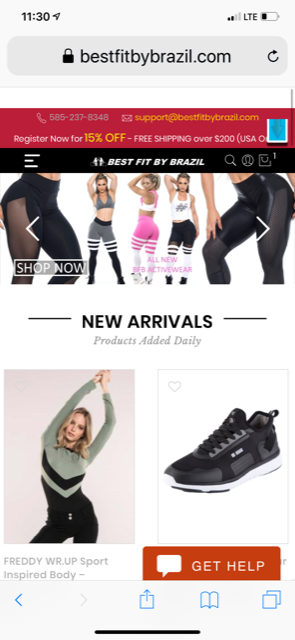
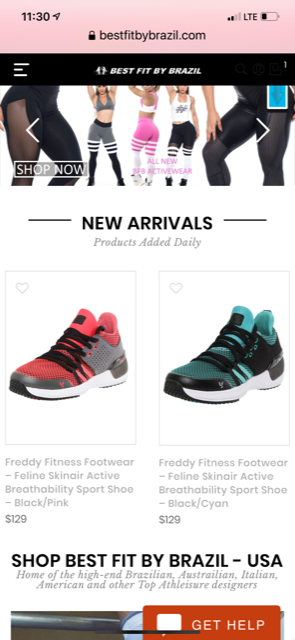
on mobile menu bar shows icons on right side. but on scroll with sticky they disappear. only thing showing is “1” which is how many items in cart, but no cart icon. How to show the icons after scroll on mobile and desktop
Before Scroll on Mobile:
After Scroll on Mobile:
 May 11, 2019 at 9:45 pm #31119
In reply to: Image alt text and name
Hi Rahim,
Please add below code to claue-child > functions.php to line 15
wp_enqueue_script( 'custom-script', get_stylesheet_directory_uri() . '/custom.js', array( 'jquery' ) );to
function jas_claue_enqueue_script() {
	wp_enqueue_style( 'jas-claue-parent-style', get_template_directory_uri() . '/style.css' );
	wp_enqueue_script( 'custom-script', get_stylesheet_directory_uri() . '/custom.js', array( 'jquery' ) );
}
add_action( 'wp_enqueue_scripts', 'jas_claue_enqueue_script' );
and create file custom.js in claue-child and put your script code in this file.
Kind regards
Harry
Premium Wordpress themes and plugins, Best WooCommerce theme https://themeforest.net/user/janstudio/portfolio?ref=janstudioMay 11, 2019 at 9:08 pm #31114In reply to: Header height
Hi,
please add below code to Claue > Theme Option > General Layout > Custom CSS
.header__top {
	padding: 5px 15px;
}
and change 5px with your number
Kind regards
Harry
Premium Wordpress themes and plugins, Best WooCommerce theme https://themeforest.net/user/janstudio/portfolio?ref=janstudioMay 10, 2019 at 8:10 am #31096In reply to: different distances between menu and metaslider
Hi Green,
Thank you for choose our theme.
Please add below code to JanStudio > Theme Option > General Layout > Custom CSS
.jas-row.jas-page > div {margin-top:0;}Kind regards
Harry
Premium Wordpress themes and plugins, Best WooCommerce theme https://themeforest.net/user/janstudio/portfolio?ref=janstudio -
AuthorSearch Results


Support Forum
We will do our best to assist you with any issues related to our themes and plugins.
Response time up to 1-2 business days.
Our timezone:2:19 PM
Your timezone:
-
Search Results
-
Topic: Icons disappear on sticky



