
-
AuthorSearch Results
-
May 3, 2019 at 10:50 am #30835
In reply to: Most images did not upload on new install!
I add the code get rid of Additional Information tab and Review tab at the bottom, it not break your site.
Do you want complete remove tab at bottom? (for Vendor Info, More products) too?
If that please add below code to Theme Option > General Layout > Custom CSS
.woocommerce-tabs.wc-tabs-wrapper.mt__80 {
	display: none;
}
Kind regards
Harry
Premium Wordpress themes and plugins, Best WooCommerce theme https://themeforest.net/user/janstudio/portfolio?ref=janstudioMay 2, 2019 at 7:43 pm #30798In reply to: Icon & dropdown filter on shop page
Hi,
Please add more custom css code
.woocommerce-ordering, .cart .yith-wcwl-add-to-wishlist {
	border-radius: 0;
}
Kind regards
Harry
Premium Wordpress themes and plugins, Best WooCommerce theme https://themeforest.net/user/janstudio/portfolio?ref=janstudioMay 2, 2019 at 4:33 pm #30781In reply to: Most images did not upload on new install!
Hi Brent,
Please change code to
/** Remove short description if product tabs are not displayed */
add_filter( 'woocommerce_product_tabs', 'woo_remove_product_tabs', 98 );

function woo_remove_product_tabs( $tabs ) {
    unset( $tabs['description'] );
    unset( $tabs['additional_information'] );
    unset( $tabs['reviews'] );     	// Remove the description tab
    return $tabs;
}

function dot_reorder_product_page() {
    if ( get_option('woocommerce_product_tabs') == false ) {
        remove_action( 'woocommerce_single_product_summary', 'woocommerce_template_single_excerpt', 20 );
    }
}
add_action( 'woocommerce_before_main_content', 'dot_reorder_product_page' );

/** Display product description the_content */
function dot_do_product_desc() {

    global $woocommerce, $post;

    if ( $post->post_content ) : ?>
        <div itemprop="description" class="item-description">
            <?php $heading = apply_filters('woocommerce_product_description_heading', __('Product Description', 'woocommerce')); ?>

            <!-- <h2><?php echo $heading; ?></h2> -->
            <?php the_content(); ?>

        </div>
    <?php endif;
}
add_action( 'woocommerce_single_product_summary', 'dot_do_product_desc', 20 );
And add new code to JanStudio > Theme Option > General Layout > Custom CSS
.woocommerce-product-details__short-description {
	display: none;
}
Kind regards
Harry
Premium Wordpress themes and plugins, Best WooCommerce theme https://themeforest.net/user/janstudio/portfolio?ref=janstudioMay 1, 2019 at 9:40 pm #30766In reply to: Icon & dropdown filter on shop page
Hi,
Please add below custom CSS in Claue > Theme Option > General Layout > Custom CSS
.wc-col-switch a::before {
	width: 8px;
	height: 18px;
}
.wc-col-switch a {
	height: 24px;
}
.wc-col-switch a.one {
	width: 14px;
}
.wc-col-switch a.one::before {
	width: 8px;
}
.wc-col-switch a.two {
	width: 24px;
}
.wc-col-switch a.two::before {
	box-shadow: 10px 0 0 #878787, 10px 0 0 #878787;
}
.wc-col-switch a.two:hover::before, .wc-col-switch a.two.active::before {
	box-shadow: 10px 0 0 #222, 10px 0 0 #222;
}
.wc-col-switch a.three {
	width: 34px;
}
.wc-col-switch a.three::before {
	box-shadow: 10px 0 0 #878787, 20px 0 0 #878787;
}
.wc-col-switch a.three:hover::before, .wc-col-switch a.three.active::before {
	box-shadow: 10px 0 0 #222, 20px 0 0 #222;
}
.wc-col-switch a.four {
	width: 44px;
}
.wc-col-switch a.four::before {
	box-shadow: 10px 0 0 #878787, 20px 0 0 #878787, 30px 0 0 #878787;
}
.wc-col-switch a.four:hover::before, .wc-col-switch a.four.active::before {
	box-shadow: 10px 0 0 #222, 20px 0 0 #222, 30px 0 0 #222;
}
.wc-col-switch a.six {
	width: 64px;
}
.wc-col-switch a.six::before {
	box-shadow: 10px 0 0 #878787, 20px 0 0 #878787, 30px 0 0 #878787, 40px 0 0 #878787, 50px 0 0 #878787;
}
.wc-col-switch a.six:hover::before, .wc-col-switch a.six.active::before {
	box-shadow: 10px 0 0 #222, 20px 0 0 #222, 30px 0 0 #222, 40px 0 0 #222, 50px 0 0 #222;
}
For the filter, could you tell me the details.
Kind regards
Harry
Premium Wordpress themes and plugins, Best WooCommerce theme https://themeforest.net/user/janstudio/portfolio?ref=janstudioMay 1, 2019 at 9:18 pm #30763In reply to: The Image Quality
Hi,
The issue because your image smaller than content. You should upload image has width bigger than 1280px
to make the text on banner responsive on mobile, please add below code to Claue > Theme Option > General Layout > Custom CSS
@media only screen and (max-width: 1023px) {
.jas-promotion h4 {font-size: 40px !important;}
.jas-promotion h3 {font-size: 18px !important;}
}
@media only screen and (max-width: 736px) {
.jas-promotion h4 {font-size: 25px !important;}
.jas-promotion h3 {font-size: 15px !important;}
}
Kind regards
Harry
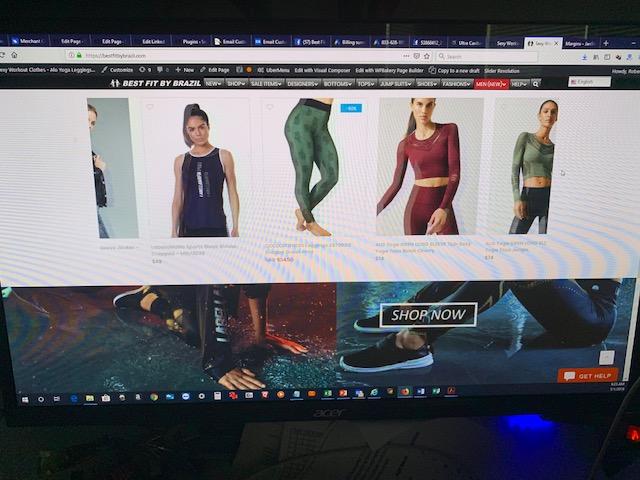
Premium Wordpress themes and plugins, Best WooCommerce theme https://themeforest.net/user/janstudio/portfolio?ref=janstudiook you made it work somehow. how? i have on my page this product slider called “Trending” and there are no margins set to indent the element in WPBakery. I think you did it in css or something. Does this work easier in Visual Composer? i have this also.
product slider element “Indented margins”
Responsive settings on devices

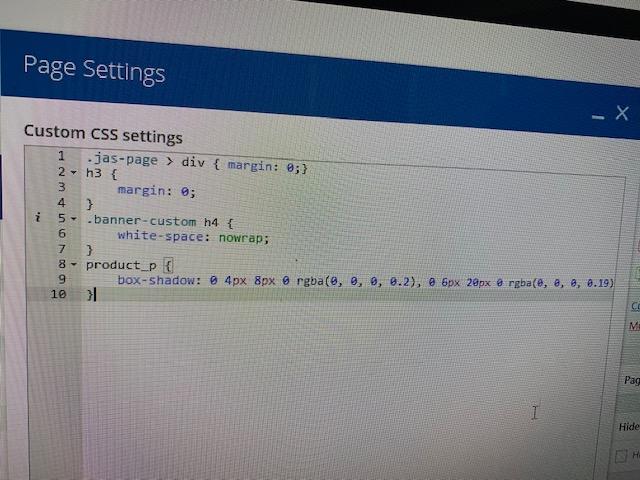
page settings in wpBakery
 May 1, 2019 at 5:59 pm #30751
In reply to: Change image color
Hi,
Please add below code to Claue > Theme Option > General Layout > Custom CSS
.badge .new {
	right: 30px;
	left: auto;
}
Kind regards
Harry
Premium Wordpress themes and plugins, Best WooCommerce theme https://themeforest.net/user/janstudio/portfolio?ref=janstudioMay 1, 2019 at 3:45 pm #30745In reply to: Change image color
Hi,
Please add below code to Claue > Theme Option > General Layout > Custom CSS
.product-image a.db:before {
	background: transparent;
}
Kind regards
Harry
Premium Wordpress themes and plugins, Best WooCommerce theme https://themeforest.net/user/janstudio/portfolio?ref=janstudioMay 1, 2019 at 3:31 pm #30742In reply to: Button Style
Hi Kent,
Please add below code to Claue > Theme Option > General Layout > Custom CSS
input[type="submit"], button, a.button, .jas-ajax-load a, .actions .coupon input,
.signup-newsletter-form,
.signup-newsletter-form input.input-text,
.signup-newsletter-form input.submit-btn,
form .quantity, .single_add_to_cart_button, .br__40 {
	border-radius: 0;
}
Kind regards
Harry
Premium Wordpress themes and plugins, Best WooCommerce theme https://themeforest.net/user/janstudio/portfolio?ref=janstudioApril 30, 2019 at 2:33 pm #30717In reply to: Recommendations and New Ideas
Hi Harry,
I think it’s not a bad idea to add a
background-colorto product attributes in the product listing.In these photos reading the letters like
SMLare hard.Something like this but not full width. http://prntscr.com/nikv96
it can have left and right padding from the letters like top and button.
If you decided to add this on the next update, I will appreciate to have your CSS. 🙂
Regards
Rahim Vaziri
CEO & Founder at Look.ir -
AuthorSearch Results


Support Forum
We will do our best to assist you with any issues related to our themes and plugins.




