



Forum Replies Created
-
AuthorPosts
-
1. You can hide on Shop this by go to Claue > Theme Option > WooCommerce > General Settings > Enable Page Title > Off
2. On category page you can add custom css Claue > Theme Option > General Layout > Custom CSS.archive .page-head { display: none;}
Best regards
Harry
Premium Wordpress themes and plugins, Best WooCommerce theme https://themeforest.net/user/janstudio/portfolio?ref=janstudioHi,
You can hide second menu on shop and category page by go to Apperance > Widget > WooCommerce Categories Menu Sidebar > and remove widget in this widget area
Best regards
Harry
Premium Wordpress themes and plugins, Best WooCommerce theme https://themeforest.net/user/janstudio/portfolio?ref=janstudioCould you send us your website url and admin account as private reply. We will take a look and help you solve your issue.
thanks
Harry
Premium Wordpress themes and plugins, Best WooCommerce theme https://themeforest.net/user/janstudio/portfolio?ref=janstudio1. This code will not work with new version of Gecko
2. You can try this css
@media only screen and (max-width: 1100px) {
.jas-menu > li:not(:first-child) { margin-left: 12px; }
}
3. You can follow this screen
https://monosnap.com/file/f8WUMxQmcBunCnlyZRM6in3ouygY6T#
4. You need go to WooCommerce > Settings > Products > Display > Product Image > And change all dimension to square to match with your original image. after that go to Tools > Regenerate Thumb
5. Sorry i still don’t understand your issue.
Harry
Premium Wordpress themes and plugins, Best WooCommerce theme https://themeforest.net/user/janstudio/portfolio?ref=janstudioYou can remove space on left and right by edit wrapper row and uncheck wrap content
https://monosnap.com/file/HemR4tvXziocgFFbvbce5tYbElZgUO
Best regards
Harry
Premium Wordpress themes and plugins, Best WooCommerce theme https://themeforest.net/user/janstudio/portfolio?ref=janstudioHi,
I checked your site on mobile and saw the banner work.
You can change css to
@media only screen and (max-width: 568px) {
.home .vc_row-o-full-height { min-height: inherit !important; padding: 50px 0 70px !important;}
.vc_row-o-full-height .pa-center .fs__14 span { font-size: 14pt !important;}
.vc_row-o-full-height .pa-center h3.fs__50 { font-size: 10pt !important;}
.pa-center h2, .pa-center h3 { margin: 0;}
}
The image banner on mobile same effect on desktop, it will resize as screen resolution, we can’t care 100% for all device resolution. We only make it better.
Best regards
Harry
Premium Wordpress themes and plugins, Best WooCommerce theme https://themeforest.net/user/janstudio/portfolio?ref=janstudioWe are sorry because the issue not resolve.
1. On my screen 1920 x 1080 the banner display good, it hard to fix the issue because it defend on screen resolution of user computer.
The issue image zoom because the first it load original image, after loaded the image reduce to fit with your screen. When the height meet or the width meet screen resolution other dimension will cut off ( left, right of banner with your case ).
2. Can you try this code for mobile, hope this time it done
@media only screen and (max-width: 568px) {
.home .vc_row-o-full-height { min-height: inherit !important; padding: 80px 0 100px !important;}
}
Best regards
Harry
Premium Wordpress themes and plugins, Best WooCommerce theme https://themeforest.net/user/janstudio/portfolio?ref=janstudioMay 29, 2017 at 9:58 am in reply to: How to find the menus demo pages. And change main images (I'm using "Home 4")? #4711Hello mindsilver,
Thank you for purchase.
Sorry for late reply.
1. I checked your site and saw you solved issue with homepage.
2. You can find the page link on menu by go to Appearance > Menus > Main Menu
https://monosnap.com/file/rc7hTRyuPf74pNIRJFJyfHVfDA3S1e#
3. You change image background on top page by follow this screen shot
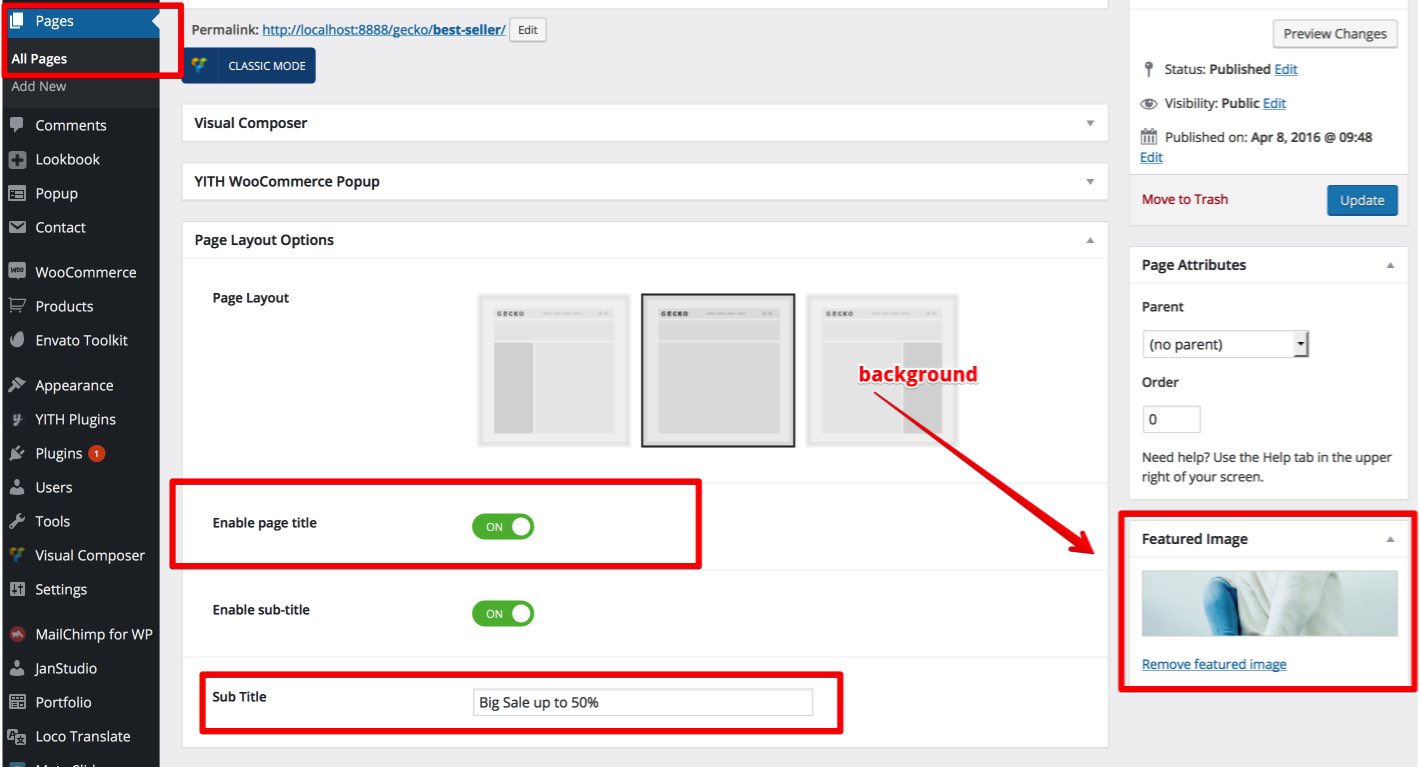
4. You can edit home 4 by go to Dashboard > Pages > Home 4 > Edit
5. You can edit logo in footer by go to Appearance > Widgets > Footer Area #1.
Best regards
Harry
Premium Wordpress themes and plugins, Best WooCommerce theme https://themeforest.net/user/janstudio/portfolio?ref=janstudioSorry because the issue.
Because the upload field doesn’t support Ajax add to cart.
Now i disabled Ajax add to cart at WooCommerce > Settings > Product > Display > Add to cart behavior
https://monosnap.com/file/Lsi8HnxzwuvXZRRY49XxwUOy65VD4d#
It now working well.
Best regards
Harry
Premium Wordpress themes and plugins, Best WooCommerce theme https://themeforest.net/user/janstudio/portfolio?ref=janstudioHello,
i helped you fixed issue on Safari con Mac.
We recommend you update Safari to latest version 10.1.1 on Mac for more fix bugs and security update.
The version 5.1.7 release from 2013 out dated for a long time.
And Safari on Windows latest version is 5.1.7 Apple doesn’t update this version 4 year, they stop support this.
Best regards
Harry
Premium Wordpress themes and plugins, Best WooCommerce theme https://themeforest.net/user/janstudio/portfolio?ref=janstudio -
AuthorPosts

