



Forum Replies Created
-
AuthorPosts
-
Hi,
You can change background of badge on menu by add custom css code in Claue > Theme Option > General Layout > Custom CSS
.jas-menu li.new > a::after { background: #01bad4;}
.jas-menu li.sale > a::after { background: #ffa800; }
.jas-menu li.hot > a::after { background: #ff3e11; }
.badge span.onsale { background: #fe9931; }
.badge .new { background: #56cfe1 ; }
Change color as yours.
Best regards
Harry
Premium Wordpress themes and plugins, Best WooCommerce theme https://themeforest.net/user/janstudio/portfolio?ref=janstudioHi,
Thank you for purchase!
You can change number of post on page by go to Dashboard > Settings > Reading > Blog pages show at most and type number you want
https://monosnap.com/file/DSlH8D44kZhU2wzHwvVzpJKKQFUufr#
Best regards
Harry
Premium Wordpress themes and plugins, Best WooCommerce theme https://themeforest.net/user/janstudio/portfolio?ref=janstudioIf your image have different dimension it will display like your screen.
Do you want display like us (some of your image will be crop)? send us your website link we will give us code to make it.
Best regards
Harry
Premium Wordpress themes and plugins, Best WooCommerce theme https://themeforest.net/user/janstudio/portfolio?ref=janstudioHi,
– “New” badge will hide after 5 days or you can delete when edit product > Product Detail Layout Option > New Arrival Product
– “Sale” for display on sale product
You can add custom css in Claue > ThemeOption > General Layout > Custom CSS
.badge span { display: none;}
Best regards
Harry
Premium Wordpress themes and plugins, Best WooCommerce theme https://themeforest.net/user/janstudio/portfolio?ref=janstudiohi,
You can follow this screen.
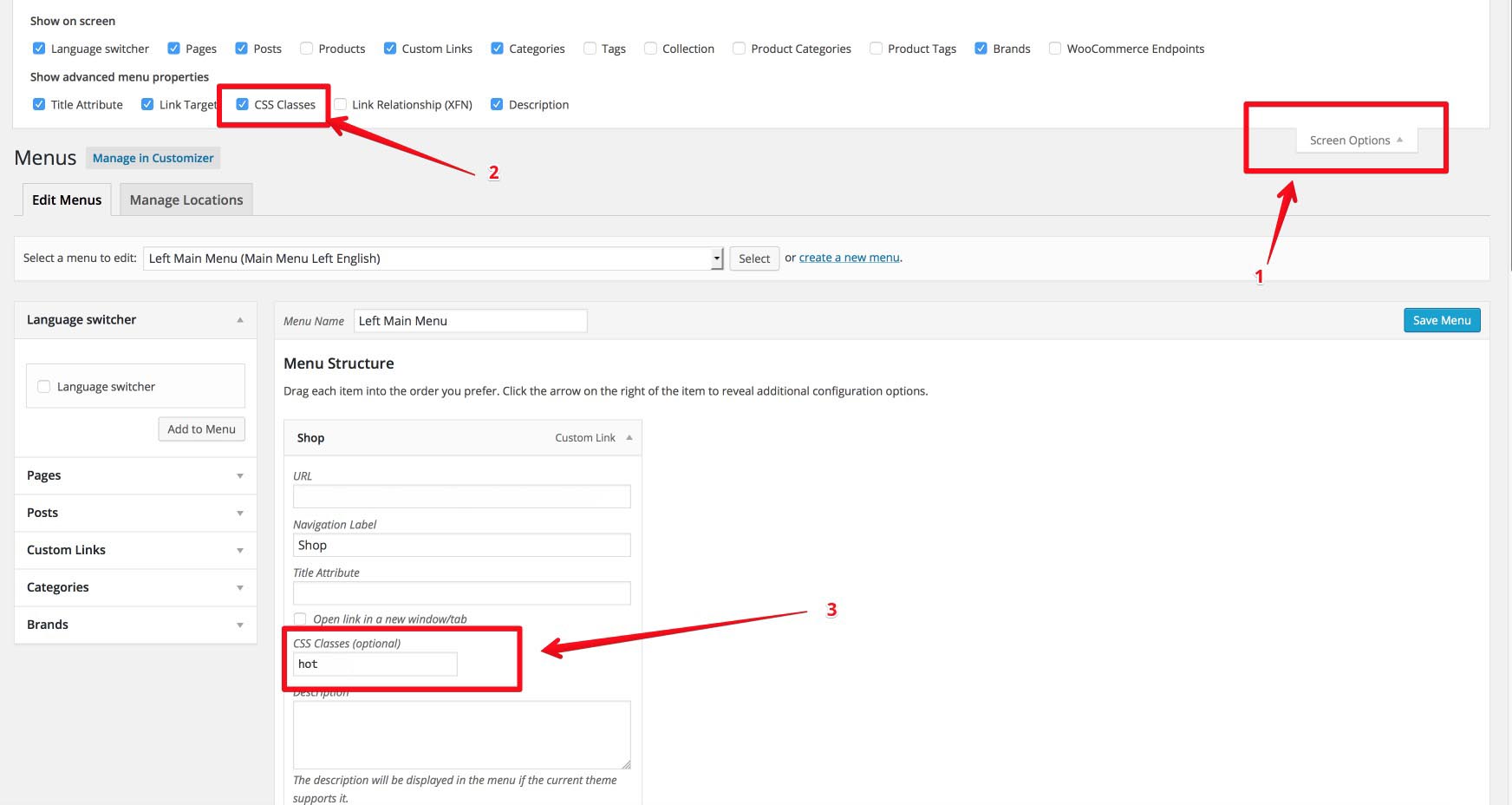
Harry
Premium Wordpress themes and plugins, Best WooCommerce theme https://themeforest.net/user/janstudio/portfolio?ref=janstudioYou don’t need css for this.
You go to Appearance > Menus and follow our step at our document http://janstudio.net/claue/document/ navigate to Page Layout > Menu Badge.
Our document guide you change the badge for menu.
Best regards
Harry
Premium Wordpress themes and plugins, Best WooCommerce theme https://themeforest.net/user/janstudio/portfolio?ref=janstudioHi,
Page Layout > Menu Badge is on our document.
You screenshot is theme option.
Best regards
Harry
Premium Wordpress themes and plugins, Best WooCommerce theme https://themeforest.net/user/janstudio/portfolio?ref=janstudioFor the attribute display when hover, you can disable by go to Dashboard > Claue > Theme Option > WooCommerce > Product Listing Setting > Enable Products Attribute On Product List > Uncheck all
Harry
Premium Wordpress themes and plugins, Best WooCommerce theme https://themeforest.net/user/janstudio/portfolio?ref=janstudioCan you send us your website link and admin account as private reply. I will help you build this layout after that you can change with your content.
Best regards
Harry
Premium Wordpress themes and plugins, Best WooCommerce theme https://themeforest.net/user/janstudio/portfolio?ref=janstudioHi,
Thank you for purchase!
1. You can change your home page layout to home 4 in Settings > Reading > Front page > Select Home 4
https://monosnap.com/file/Ehpqa3IwK3zi9uOnrple6rbfrXvNT9#
2. Can you explain more? you mean when hover thumb, it change to another image?
Thank
Harry
Premium Wordpress themes and plugins, Best WooCommerce theme https://themeforest.net/user/janstudio/portfolio?ref=janstudio -
AuthorPosts

