
-
AuthorSearch Results
-
April 24, 2018 at 11:13 am #19450
In reply to: Pending Status not auto-changing to Processing
I have yet to get this to work along with restoring the wishlist hearts on products. it works on sexyleggingsusa.com testing area which has same version woocommerce, but older claue. after testing all of the plugins, I think we have to assume it might be claue theme? But if I use another theme in live preview mode the hearts don’t show there either, but wouldn’t that be because the css code is not in that theme?
April 23, 2018 at 10:15 pm #19417In reply to: Change the Header Area Logo
Hi Tutorial,
This issue need customize code not have option to setting so we don’t have record video.
1. Please upload normal logo in Claue > Theme Option > Header > Logo
2. Please add below code to Claue > Theme Option > General Layout > Custom CSS
.header-sticky .jas-branding a {
background: url(http://claue.jan/dev/wp-content/uploads/2018/04/brand10.png) center center no-repeat;
background-size: cover;
height: 40px;
width: 200px;
}
.header-sticky .jas-branding a img { display: none !important;}
Please change http://claue.jan/dev/wp-content/uploads/2018/04/brand10.png with your logo path and change width and height of logo as you want
Best regards
Harry
Premium Wordpress themes and plugins, Best WooCommerce theme https://themeforest.net/user/janstudio/portfolio?ref=janstudioApril 22, 2018 at 4:54 am #19370This reply has been marked as private.April 21, 2018 at 1:07 am #19340In reply to: how to move the arrow
Please add below code in Claue > Theme Option > General Layout > Custom CSS
.slick-prev, .slick-next {
	top: 50%;
}
Change 50% as you want
Best regards
Harry
Premium Wordpress themes and plugins, Best WooCommerce theme https://themeforest.net/user/janstudio/portfolio?ref=janstudioApril 21, 2018 at 12:15 am #19334In reply to: Product variation tooltips not working
Hi,
Please add below code to Claue > Theme Option > General Layout > Custom CSS
.swatch__list--item.is-selected .swatch__tooltip { display: none;}Best regards
Harry
Premium Wordpress themes and plugins, Best WooCommerce theme https://themeforest.net/user/janstudio/portfolio?ref=janstudioApril 20, 2018 at 11:26 pm #19327In reply to: how to change the distance
Please add below code to Claue > Theme Option > General Layout > Custom CSS
.jas-menu > li:not(:first-child) {
	margin-left: 50px;
}
Change 50 as your number
Harry
Premium Wordpress themes and plugins, Best WooCommerce theme https://themeforest.net/user/janstudio/portfolio?ref=janstudioApril 20, 2018 at 11:23 pm #19325In reply to: how to let the button bigger
Hi,
Please add below code to Claue > Theme Option > General Layout > Custom CSS
.variations .swatch__value {
	width: 30px;
	height: 30px;
	line-height: 30px;
}
Harry
Premium Wordpress themes and plugins, Best WooCommerce theme https://themeforest.net/user/janstudio/portfolio?ref=janstudioApril 20, 2018 at 12:51 pm #19309In reply to: Shop menu on homepage
I help you fix menu on homepage on mobile
Thanks Harry. The menu is now appearing in 1 row which is great. However the left part of the menu is still getting cropped. Can you pls check it once again? Screenshot below (modified screenshot in paint to illustrate the current problem)
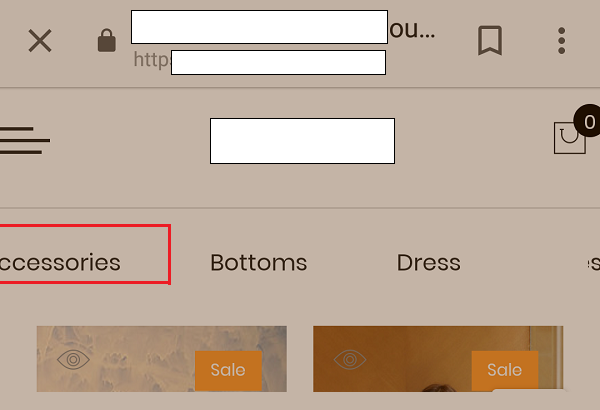
2 new error is new tech of css so the check tool don’t understand. Don’t worry about it
Please copy code and check at here https://jigsaw.w3.org/css-validator/#validate_by_input
Thanks for the clarification. I’ll ignore the 2 errors.
April 20, 2018 at 11:04 am #19300In reply to: Quantity increase button issues
Hi,
Please add below code to Claue > Theme Option > General Layout > Custom CSS
.jas-sticky-atc .quantity input.input-text[type="number"] {
	width: 80px;
}
Best regards
Harry
Premium Wordpress themes and plugins, Best WooCommerce theme https://themeforest.net/user/janstudio/portfolio?ref=janstudioApril 19, 2018 at 11:54 pm #19276In reply to: Shop menu on homepage
I help you fix menu on homepage on mobile
2 new error is new tech of css so the check tool don’t understand. Don’t worry about it
Please copy code and check at here https://jigsaw.w3.org/css-validator/#validate_by_input
Harry
Premium Wordpress themes and plugins, Best WooCommerce theme https://themeforest.net/user/janstudio/portfolio?ref=janstudio -
AuthorSearch Results


Support Forum
We will do our best to assist you with any issues related to our themes and plugins.






