
-
AuthorSearch Results
-
April 19, 2018 at 11:11 pm #19267
In reply to: Claue Theme Quick View Issue
Ok here’s what I discovered. It seems to matter what size the screen is if the this white film covers the products. Strange for larger screens no problem, then as i resize the screen the white film appears over the products and then if i shrink even further to mobile size they disappear again. You did something for me a while back in css that helped get rid of this problem with mobile. maybe you can give me some code to avoid this for all screen sizes.
Here’s the video of what I’m talking about.
Attachments:
You must be logged in to view attached files.April 19, 2018 at 8:04 pm #19258In reply to: Problem of wishlist display with grouped products
Hi Laurie,
Please add below code to Claue > Theme Option > General Layout > Custom CSS
.group_table .yith-wcwl-add-to-wishlist {
	left: 220px;
	position: absolute;
}
Best regards
Harry
Premium Wordpress themes and plugins, Best WooCommerce theme https://themeforest.net/user/janstudio/portfolio?ref=janstudioApril 19, 2018 at 8:01 pm #19257In reply to: how to let the menu background color to become white
Hi,
Please add below code to Claue > Theme Option > General Layout > Custom CSS
.jas-account-menu ul, .jas-menu > li > ul {
	background: rgba(255, 255, 255, 1) !important;
}
Harry
Premium Wordpress themes and plugins, Best WooCommerce theme https://themeforest.net/user/janstudio/portfolio?ref=janstudioApril 19, 2018 at 7:10 pm #19255In reply to: Shop menu on homepage
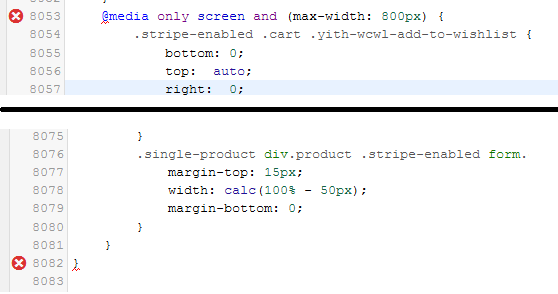
I fixed 2 error message in style.css file
Thanks. But I again see 2 new errors. Screenshot below
 April 19, 2018 at 6:41 pm #19250
In reply to: Shop menu on homepage
I fixed 2 error message in style.css file
Best regards
Harry
Premium Wordpress themes and plugins, Best WooCommerce theme https://themeforest.net/user/janstudio/portfolio?ref=janstudioApril 19, 2018 at 6:01 pm #19246In reply to: Shop menu on homepage
Hi Mikestar,
Please add below code to Claue > Theme Option > General Layout > Custom CSS
@media only screen and (max-width: 736) {
.shop-top-sidebar {height: 50px;}
}
Best regards
Harry
Premium Wordpress themes and plugins, Best WooCommerce theme https://themeforest.net/user/janstudio/portfolio?ref=janstudioApril 19, 2018 at 4:38 pm #19243In reply to: Claue Theme Quick View Issue
Hi,
Please add below code to Claue > Theme Option > General Layout > custom css
.product-image a.db::before { display: none;}Best regards
Harry
Premium Wordpress themes and plugins, Best WooCommerce theme https://themeforest.net/user/janstudio/portfolio?ref=janstudioApril 19, 2018 at 11:01 am #19222In reply to: Shop menu on homepage
Hi Harry, while yo have access to the site, can you pls also look at the Style.css – it is showing 2 error. Error: There are 2 errors which must be fixed before you can update this file.
Thanks.
Hi,
Do you have web font of this font? Please include in child theme and override font style in style.css.
Best regards
Harry
Premium Wordpress themes and plugins, Best WooCommerce theme https://themeforest.net/user/janstudio/portfolio?ref=janstudioApril 19, 2018 at 9:46 am #19213In reply to: Shop sub category menu dropdown list
Hi Mikestar
Please use below code and add to Claue > Theme Option > General Layout > Custom CSS
.shop-top-sidebar .widget ul li.cat-parent:after {
content: '\f107';
position: absolute;
font-family: 'FontAwesome';
top: 10px;
right: 2px;
}
Best regards
Harry
Premium Wordpress themes and plugins, Best WooCommerce theme https://themeforest.net/user/janstudio/portfolio?ref=janstudio -
AuthorSearch Results


Support Forum
We will do our best to assist you with any issues related to our themes and plugins.




