Hi Tom,
Please add below code to Claue > Theme Option > General Layout > Custom CSS
.jas-col-md-4.jas-col-sm-6.jas-col-xs-12.start-md.start-sm.center-xs,
.jas-col-md-4.jas-col-sm-2.jas-col-xs-12.flex.end-md.hidden-sm.hidden-xs {
	max-width: 10%;
	flex-basis: 10%;
}
.jas-col-md-4.jas-col-sm-6.jas-col-xs-12.center-md.end-sm.center-xs {
	max-width: 80%;
	flex-basis: 80%;
}
and remove
in your code.
The link to renew support at https://themeforest.net/downloads
Thank and regards
Harry
Premium Wordpress themes and plugins, Best WooCommerce theme https://themeforest.net/user/janstudio/portfolio?ref=janstudio
Hi,
Please add below code to Claue > Theme Option > General Layout > Custom CSS
.is-label .swatch__value {
	width: auto;
	border-radius: 5px;
	display: inline-block;
}
.is-label .swatch__list--item {
	border-radius: 5px;
	padding: 2px 5px;
}
Kind regards
Harry
Premium Wordpress themes and plugins, Best WooCommerce theme https://themeforest.net/user/janstudio/portfolio?ref=janstudio
Hi,
Text labels for variation swatches gets a linebreak after 3 characters placing text outside the box.
I have tried to extend the width of the box through custom CSS with no luck.
How can this be resolved.
Best regards,
Jon Kristen
Attachments:
You must be
logged in to view attached files.
Hi,
You can change background for search form by add below code to Claue > Theme Option > General Layout > Custom CSS
.header__search {
	background: #000;
	opacity: 0.95;
}
and change #000 with your color, opacity from 0.0 to 1.0
if you want show search label, please download attach file extract and put in claue-child > views > header
By the way, your support expired. Please renew your support at https://themeforest.net/downloads that will help us continue improve our theme and update new features.
Thanks and regards
Attachments:
You must be
logged in to view attached files.
Harry
Premium Wordpress themes and plugins, Best WooCommerce theme https://themeforest.net/user/janstudio/portfolio?ref=janstudio
Hi,
Please add below code to Claue > Theme Option > General Layout > Custom CSS
@media only screen and (max-width: 768px) {
.header__mid.pl__15.pr__15 {
	padding: 0;
}
.jas-action.flex.center-xs.middle-xs.hide-md.hidden-sm.visible-xs.mt__30 {
	display: none !important;
}
.jas-icon-cart.pr {
	padding-right: 0;
}
.header-sticky .sticky-logo {
	max-width: 100px;
}}
Kind regards
Harry
Premium Wordpress themes and plugins, Best WooCommerce theme https://themeforest.net/user/janstudio/portfolio?ref=janstudio
The website’s checkout section page, contains two boxes which are not clickable(faded). We inspected on that section, and on changing some CSS code i.e from position:absolute to position:relative , the section was clickable. We tried to add code on the theme editor and additional css section, but it didn’t work. We mailed the issue earlier to Janstudio, and with your suggestion we currently have deactivated the “continue shopping” and “estimated delivery” plugin on our site(which were earlier present on the checkout page). Could you please provide us a quick solution. We are stuck at it for 3 days.
Also, any changes you make or any plugin if you deactivate, please let us also know, as this site is very crucial to us.
Below are the images attached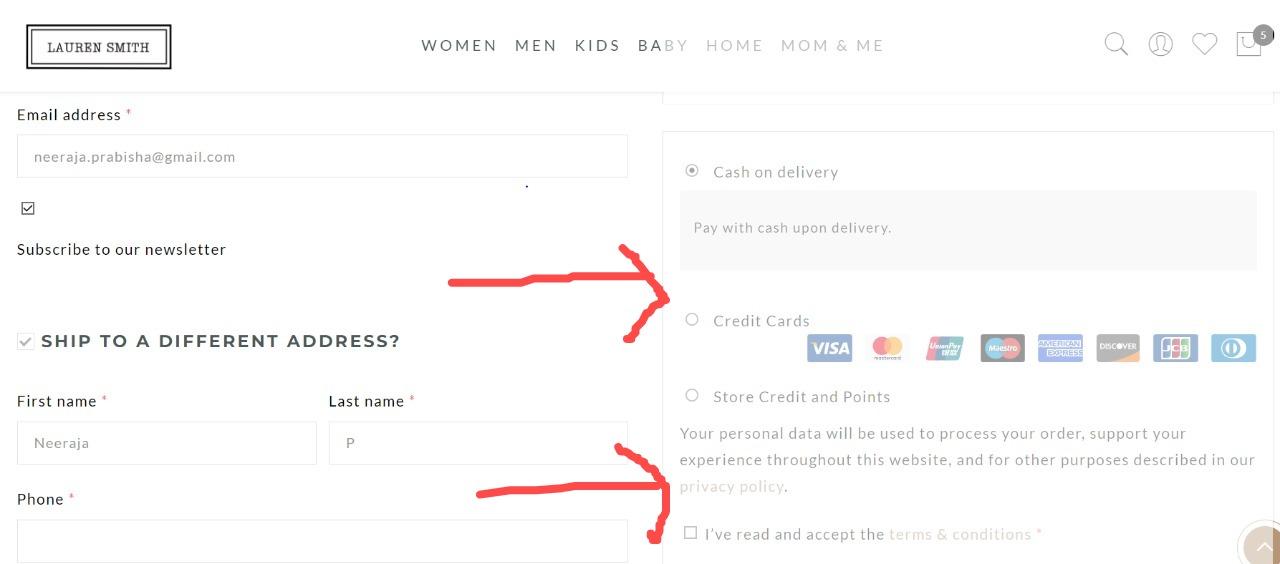
Hi,
Please use plugin to optimize the images https://wordpress.org/plugins/wp-smushit/ and css/js https://wordpress.org/plugins/autoptimize/ on your site
Kind regards
Harry
Premium Wordpress themes and plugins, Best WooCommerce theme https://themeforest.net/user/janstudio/portfolio?ref=janstudio
Hi,
1,2. You can change font size and color by add custom css code to Claue > Theme Option > General Layout > Custom CSS
.header__search input[type="text"] {
	border-bottom: 1px solid #fff;
	font-size: 20px;
	color: #fff;
}
and change 20 to your number, #fff with your color
3. Please use this plugin https://wordpress.org/plugins/header-footer-elementor/
4. Please add below code to to Claue > Theme Option > General Layout > Custom CSS
.archive .woocommerce-breadcrumb {
	display: block;
	background: #f6f6f8;
	padding: 15px;
}
.jas-wc .page-head {
	display: none;
}
5. you can change in Appearance > Customize > WooCOmmerce > Product Catalog > Default product sorting
Kind regards
Harry
Premium Wordpress themes and plugins, Best WooCommerce theme https://themeforest.net/user/janstudio/portfolio?ref=janstudio
 Chen
Chen
Support Expired
Hi Harry,
thank you. Unfortunately the price box doesn’t change with the CSS code. Do you have another idea?
Hi Chen,
1. You can change font size of price box by add below code to Claue > Theme Option > General Layout > Custom CSS
.wapo-product-price #wapo-total-price-table table {
    font-size: 15px;
}
2. You can change setting of plugin or add custom css code to Claue > Theme Option > General Layout > Custom CSS
.yith-wapo-block .yith-wapo-addon .options.per-row-5 .yith-wapo-option {
    max-width: 70% !important;
}
I also updated your purchase code.
Kind regards
-
This reply was modified 4 years, 1 month ago by
 Harry.
Harry
Premium Wordpress themes and plugins, Best WooCommerce theme https://themeforest.net/user/janstudio/portfolio?ref=janstudio






